
To start a streaming service, pick a niche, plan a small video library, choose how to charge, and launch on a platform that hosts videos and takes payments. This guide walks through each step in order, from your first idea to your first paying members.
The biggest decision is how you build. A custom service takes months and a large budget. Uscreen handles hosting and payments for you, so you can go live in a few weeks without a development team.
Should you build a streaming service from scratch or use a platform?
Your choice depends on your budget, timeline, and current technical resources. Neither is the wrong answer. Each fits a different stage of business.
A custom build gives you full control, but you must manage it yourself. A video membership platform like Uscreen handles the technology, so you can build your own over-the-top (OTT) platform (opens in new tab) without a development team.
Here are both routes in one table:
| Build from scratch (custom dev) | Launch on a ready-made platform | |
|---|---|---|
| Time to launch | About two months for a basic app and more than six months for a complex one, according to Nimble AppGenie (opens in new tab) . | A website can be live in days. Branded mobile apps (App Essentials or Custom) and TV apps (Custom) usually take about 90 days or more, depending on your setup. |
| Upfront cost | $60,000 to $300,000+ for a Netflix-like app. | From $49/mo on Uscreen Starter. No large upfront payment is needed. |
| Who maintains it | You do. Developers must be paid for fixes and updates. | The platform team does. Updates are included in your plan. |
| Apps included | Each app must be built and paid for as part of the project. | Mobile apps come with App Essentials or Custom. TV apps come with Custom. |
| Best for | Large companies with unusual technical needs and large budgets. | Most founders launching a niche service. |
What do you need to start a streaming service?
To start a streaming service, you need four things in place before you build anything. You need a clear niche, a content plan, a monetization model, and a platform decision. A narrow, well-planned start is easier to run, and it gives you time to learn what your members want.
Each of these four items is explained below:
- A clear niche and audience: A niche is the one topic your service covers, such as yoga for runners or art lessons for kids. Your audience is the group of people who care about that topic. When both are clear, it is easier to plan your videos and set a fair price. Step 1 shows how to research both.
- A content plan: A content plan lists the videos you will have ready on launch day and the ones you will release after that. It does not need to be long. Start with your strongest videos, and set a regular release schedule so members have something new to watch.
- A monetization model: A monetization model is the way your service earns money. Subscriptions suit a library that grows over time. One-time purchases suit single programs or live events. Ads suit free content with a large audience. Many services combine two models, and you can change the choice later. Step 3 compares each model in a table.
- A platform decision: This is the choice between building your own technology and launching on a ready-made platform. It shapes your budget, your launch date, and how much you manage after launch. The comparison above covers cost and speed, and Step 4 explains what to look for in a platform.
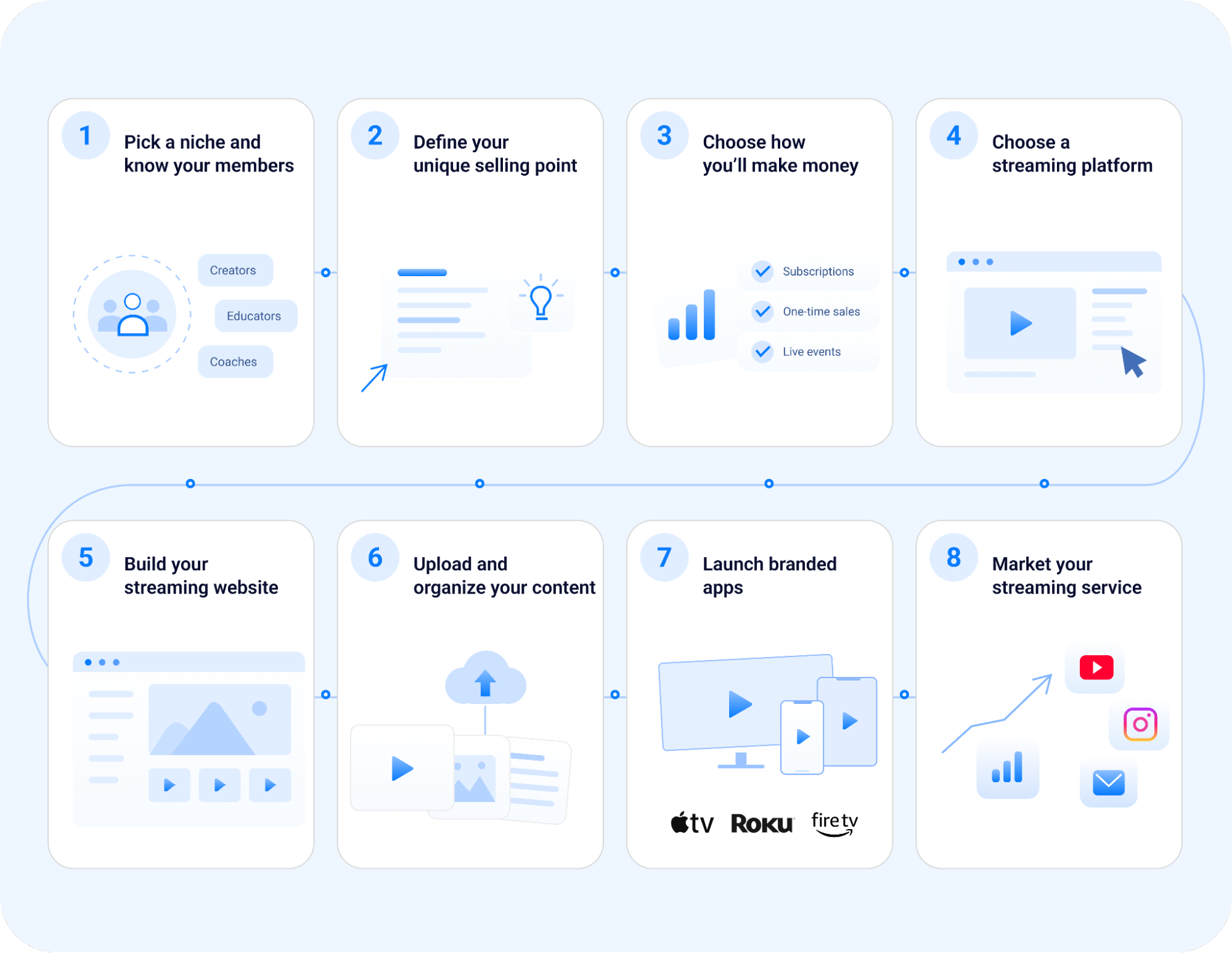
Step 1: Picking a niche and understanding your members
To pick a niche for your streaming service, choose one narrow topic that people already search for and pay for. To understand your members, learn their main goals and the reasons they might not pay. A narrow niche is easier to plan and sell because you know exactly who you are talking to. Jump Rope Dudes (opens in new tab) is a good example. Its service focuses on jump rope training, which is a small part of the wider fitness market.
You can research your niche in four steps:
- Check demand: Enter your topic in a free tool such as Google Trends or a keyword research tool. Note how many people search for it each month. Also, see whether that number is rising or falling. Steady or rising search volume indicates that people want help with the topic.
- Confirm people already pay: Search for paid courses and memberships on your topic. If people are already spending money on it, there is a market for your service. Read the reviews of these products as well. Complaints in those reviews show what members still need, and your service can offer it.
- Describe your ideal member: Write a short profile of the one person your service is built for. Note their main goal and how much free time they have. Then list the problems they face in reaching that goal. Your videos should solve those problems, so this list serves as the basis for your content plan.
- Reasons to pay and reasons to wait: Note what would make this person pay, such as faster results or expert coaching. Then note why they might not, such as the price or a lack of time. Each reason to wait points to a question your sign-up page must answer. AI chat tools can speed up this step, although reviews remain the more reliable source.
Step 2: Deciding on your unique selling point
A unique selling point (USP) is the main reason a person would pay for your streaming service. To decide yours, name the result that your members get that free videos do not give them. This step matters because YouTube already has free videos on almost every topic. People pay only when a service gives them something they value more than free content.
Write your USP as a benefit to the member. A feature is something your service has, such as high-definition (HD) video or offline viewing. A benefit is the change a member feels, such as cooking a full meal from scratch or finishing a workout plan.
Abundance+ (opens in new tab) shows how this works. On Abundance+, families watch Justin Rhodes’ homestead vlogs without ads, along with original series and a library of how-to lessons for their own land.
Means TV (opens in new tab) is a different case. Its selling point is how it is run. The service is worker-owned and ad-free, and members pay to watch its films and shows.
You can test your own USP with this line: “My service helps [type of member] [reach a result] without [a problem they have today].”
Step 3: Choosing how your streaming service makes money
Your streaming service can make money in four main ways. Members can pay a subscription fee. They can pay once for a single video, program, or event. Viewers can watch for free, funded by ads. A mix of these models is called a hybrid model. The right choice depends on how your members watch. A library that grows each week suits a subscription, and a single program or live event suits a one-time payment.
Here is how the four models compare:
| Model | How you earn | Best for | Real example |
|---|---|---|---|
| Subscription video on demand (SVOD) | Members pay monthly or annually. They can watch the whole library. | New videos on a regular schedule. A library that keeps growing. | Art for Kids Hub (opens in new tab) teaches kids to draw. It charges $5.99 a month. |
| Transactional video on demand (TVOD) | Members pay once. They get one video, program, or event. | Standalone courses. Live events. | Renting a single movie in the Apple TV app. |
| Advertising video on demand (AVOD) | Viewers watch for free. Ads pay for the content. | Free content. Very large audiences. | Free, ad-supported videos on YouTube. |
| Hybrid | You mix two or more models. | A growing library plus standalone programs. | Prodigies (opens in new tab) teaches music to kids. It sells monthly and yearly plans. It also sells a one-time Lifetime plan. |
Uscreen supports subscriptions, one-time purchases, rentals, and hybrid models, so you can change your model as your service grows. If you plan to run a free, ad-supported service, Uscreen is built for direct subscription and one-time revenue. Platforms like YouTube better serve ad-supported models. Our guide to TVOD (opens in new tab) explains one-time sales in more detail.
Step 4: Choosing a streaming platform
When choosing a streaming platform, look for one that keeps your whole service in one place and grows with you. A streaming platform hosts your videos and takes member payments. It can also run your website, live streams, email marketing, analytics, and branded apps.
Without a platform, you would need a separate tool for each job, plus time to make those tools work together. Judge each feature by what it does for your members.
Compare platforms on these five points:
- Reliable streaming: Your videos should start fast and play smoothly on phones and on TVs. A member who waits too long for a video may cancel. Check that the platform hosts your videos for you and handles playback on every device your members use.
- Flexible monetization: The platform should let you sell subscriptions, one-time purchases, or both. Your model may change as your service grows, so you need a way to add a new plan or price without a rebuild. Built-in checkout and free trials also matter because they make it easier for new members to join.
- Branded apps: Many members want to watch on their phones or TVs. Branded apps carry your name and logo in app stores, building trust in your service. On Uscreen, iOS and Android mobile apps come with the App Essentials or Custom plan, and TV apps come with the Custom plan.
- Member engagement: Members stay longer when they feel part of a group and hear from you often. Look for built-in email marketing and analytics, so you can see what members watch and contact them at the right time. Uscreen’s community tools, such as direct messages and challenges, are part of the Custom plan.
- Real support: Your members will have questions at all hours, so look for a team that answers them for you. When your members have a problem at 11 pm, Uscreen’s 24/7 support team handles it, not you. Uscreen’s coaching program also works with you on the habits that grow a membership, such as a steady publishing schedule and regular emails to members.
Uscreen was built for video membership businesses, offering video, payments, marketing, analytics, and apps in a single dashboard. Uscreen customers have earned $210M in the past 12 months, and the platform powers 4,000+ active apps. To learn more, read how an OTT platform (opens in new tab) works, or see the ways to earn in our video monetization (opens in new tab) guide.
Step 5: Building your streaming website
To make a streaming website, choose a template on your streaming platform, add your brand, and publish it. No code is needed, and you do not have to hire a developer. On Uscreen, you pick a theme and edit it in a side-by-side editor, so you see each change on screen as you make it. Your plans and checkout are part of the same site. You can have a simple site ready in days.
Every streaming website needs these pages:
- Home page: Your home page tells visitors what your service is and who it is for. Put your USP from Step 2 at the top, in one clear line. Add a few sample videos and a button to start a free trial, so visitors can act without searching for a link.
- Sign-up page: This page lists each plan and its price. Offer a free trial if you can, because it lowers the risk for a new member. Keep the form short, since each extra field is one more reason to leave. Members sign in with a link sent to their email, so they do not have to remember a password.
- Catalog page: The catalog shows all of your videos in one place. Members should find what they want in a few seconds, so sort your videos into clear categories and collections (a set of videos in a fixed order, like a course). An easy-to-browse catalog keeps members watching, and the more they watch, the more likely they are to stay.
- About and contact pages: An about page tells your story and explains why you started the service. It helps visitors trust the person behind the videos. A contact page gives members a clear way to reach you with billing or access questions, saving them time and frustration.
Art for Kids Hub is a good model. Its homepage tells parents the service is ad-free and distraction-free for kids. Its pricing section shows monthly and yearly plans, both starting with a 7-day free trial.
Step 6: Uploading and organizing your content
To upload and organize your content, add your best videos first, then sort them into categories and collections. Members judge your service by the first few videos they watch, so lead with your strongest work. On Uscreen, you can upload videos one at a time or in bulk, add details, assign each video to a category or collection, and publish.
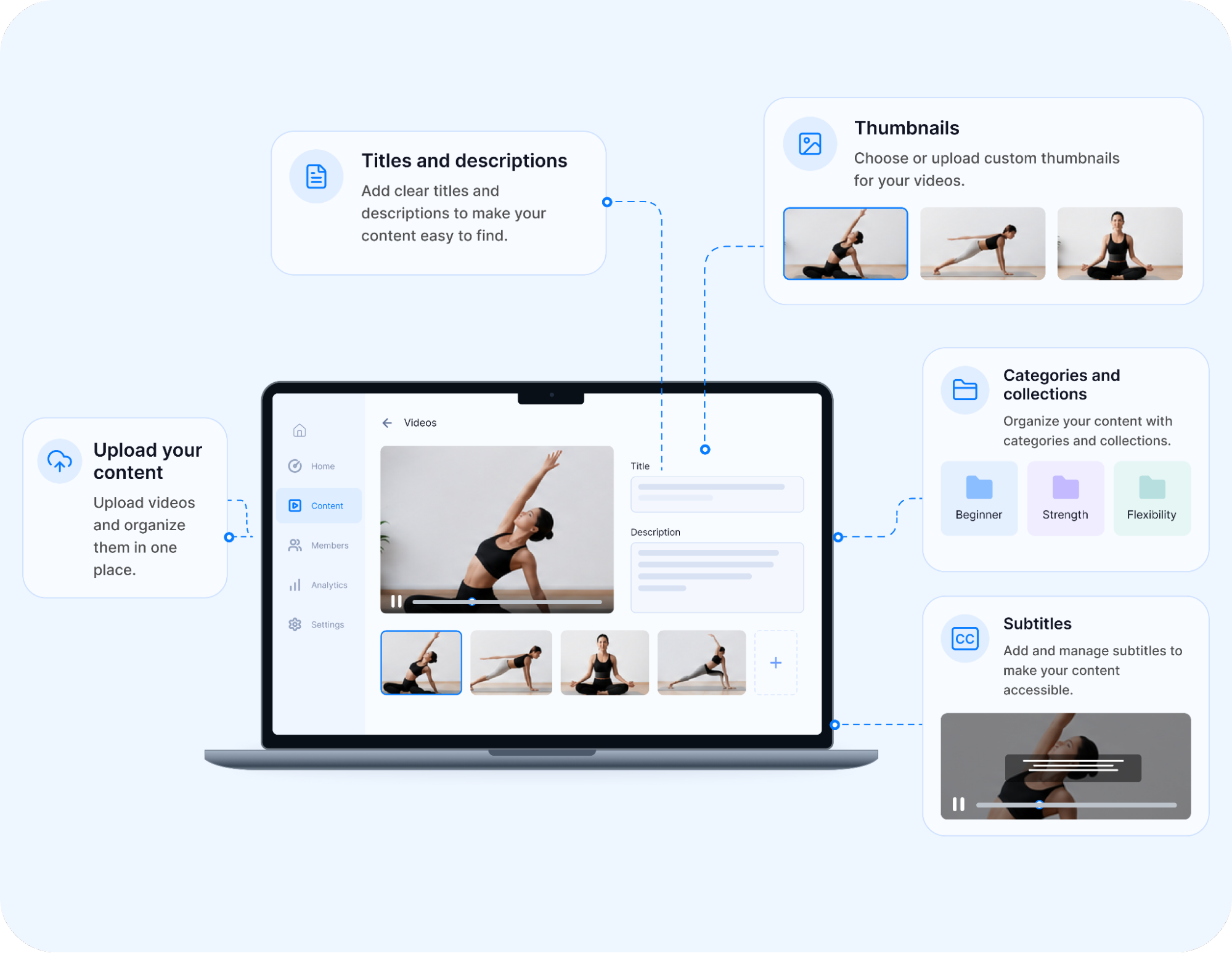
These details make your catalog easy to use:
- Titles and descriptions: Give each video a clear title that says what the member will learn or see. Use the words your members would type into a search bar. The description should explain the video’s result in two or three short sentences, so members know what to expect before they press play.
- Thumbnails: A thumbnail is the small image that appears on each video in your catalog. Use a bright, simple image with a clear face or object, and keep the same style across your library. A consistent look makes your catalog feel organized and easy to browse.
- Categories and collections: Categories group videos by topic, such as beginner workouts or holiday crafts. Collections group videos in a set order, like the lessons in a course. Together, they help members find what they want quickly and follow a clear path from one video to the next.
- Subtitles: Subtitles help members who watch with the sound off and members who speak another language. Uscreen automatically creates captions in your video’s original language when you upload it, so members who prefer reading along can follow every lesson. You can also add subtitle files in other languages.
One rule applies to every video. If a video uses footage or music created by someone else, you need a license that permits commercial use. Without that license, the video can be removed, and you could face a legal claim.
Step 7: Launching branded apps for your streaming service
To launch branded apps, choose a streaming platform that builds and submits the apps for you. On Uscreen, the team handles development, app store submission, and updates, so you never hire a developer.
Your apps usually take about 90 days or more to go live under your brand name, depending on your setup. Members then watch on the devices they already use, and that access raises sales and keeps members longer, as the figures below show.
Here is what each type of app adds to your service:
- Mobile apps (App Essentials or Custom): iOS and Android apps let members download videos to watch offline and receive a push notification when a new video is released. Uscreen data shows that members are 150% more likely to buy on their phones than on desktop computers.
- TV apps (Custom): Apps for Roku, Apple TV, Fire TV, Android TV, and Samsung TV put your library on the biggest screen in the house. Customers with TV apps earn 10x more monthly subscription revenue than customers without them. TV apps can also cut churn by up to 40%.
- Sales and retention: Uscreen customers with apps sell 1.6x more annual subscriptions and retain 15% more members. Customers who launch with mobile apps also sell 6x faster.
To see how branded apps work, visit the Uscreen app builder (opens in new tab) page. For TV, start with our guide to creating a Roku channel (opens in new tab) .
Step 8: Marketing your streaming service
To market your streaming service, reach people where they already spend time online, then bring them to your site with useful free content. Uscreen’s built-in email marketing lets you promote your service and sell memberships from the same dashboard, so you do not need a separate email tool.
Start with these four steps:
- Pick your channels: Choose one or two places where your members already gather, such as YouTube or Instagram. A short video on YouTube can lead viewers to your free trial. A small, active audience is easier to convert into paying members than a large, quiet one, so depth matters more than reach at the start.
- Make content from member goals: Use the goals and problems from your member profile in Step 1. Each problem can become a blog post or a short video that gives one useful tip. Free content like this builds trust, and it shows people what your paid library offers.
- Plan a content calendar: A content calendar lists what you will post and when. Plan a month so you post on a steady schedule. Add an email sign-up form to your site and send regular emails to the people who join. Uscreen data shows that sending two to four emails a month leads to 10% higher member retention.
- Measure what works: Check your analytics each week. Look at which posts drive visitors and which emails drive sign-ups. Do more of what works and drop what does not. Uscreen’s email tools also send automated emails, and customers who use email automation earn 2.5x more monthly revenue.
After launch, your main job is publishing new videos on a steady schedule and staying close to your analytics.
What does it cost to start a streaming service?
Starting a streaming service costs as little as $49/month on a ready-made platform like Uscreen. A custom-built service costs significantly more, with agency estimates ranging from $60,000 to $300,000+ depending on features and platforms. For most niche video businesses, a platform is a faster, far cheaper way to launch.
Here’s how they compare:
| Cost area | Custom / DIY build | Ready-made platform |
|---|---|---|
| Platform and tech | You pay developers to build hosting, playback, and payments. Nimble AppGenie (opens in new tab) estimates $15,000 to $30,000 for backend work alone. | You pay for a monthly plan. Uscreen Starter is $49/mo (opens in new tab) for up to 100 subscribers. Growth is $199/mo plus $1.99 per subscriber, or $149/mo billed yearly. |
| Apps | OnGraph (opens in new tab) quotes $60,000 to $300,000+ for a Netflix-like app. | Mobile apps come with App Essentials at $499/mo plus $0.99 per subscriber, or $449/mo billed yearly. TV apps come with the Custom plan, which is priced by quote. |
| Content | The cost depends on how you film and edit. | The cost depends on how you film and edit. |
| Ongoing / maintenance | You pay developers for every fix and update after launch. | Updates are included in your plan. One-time sales carry a 5% or 10% transaction fee, depending on your plan. Subscriptions have no per-sale fee, but Growth and higher plans add a monthly fee for each active subscriber. |
What are the common mistakes when launching a streaming service?
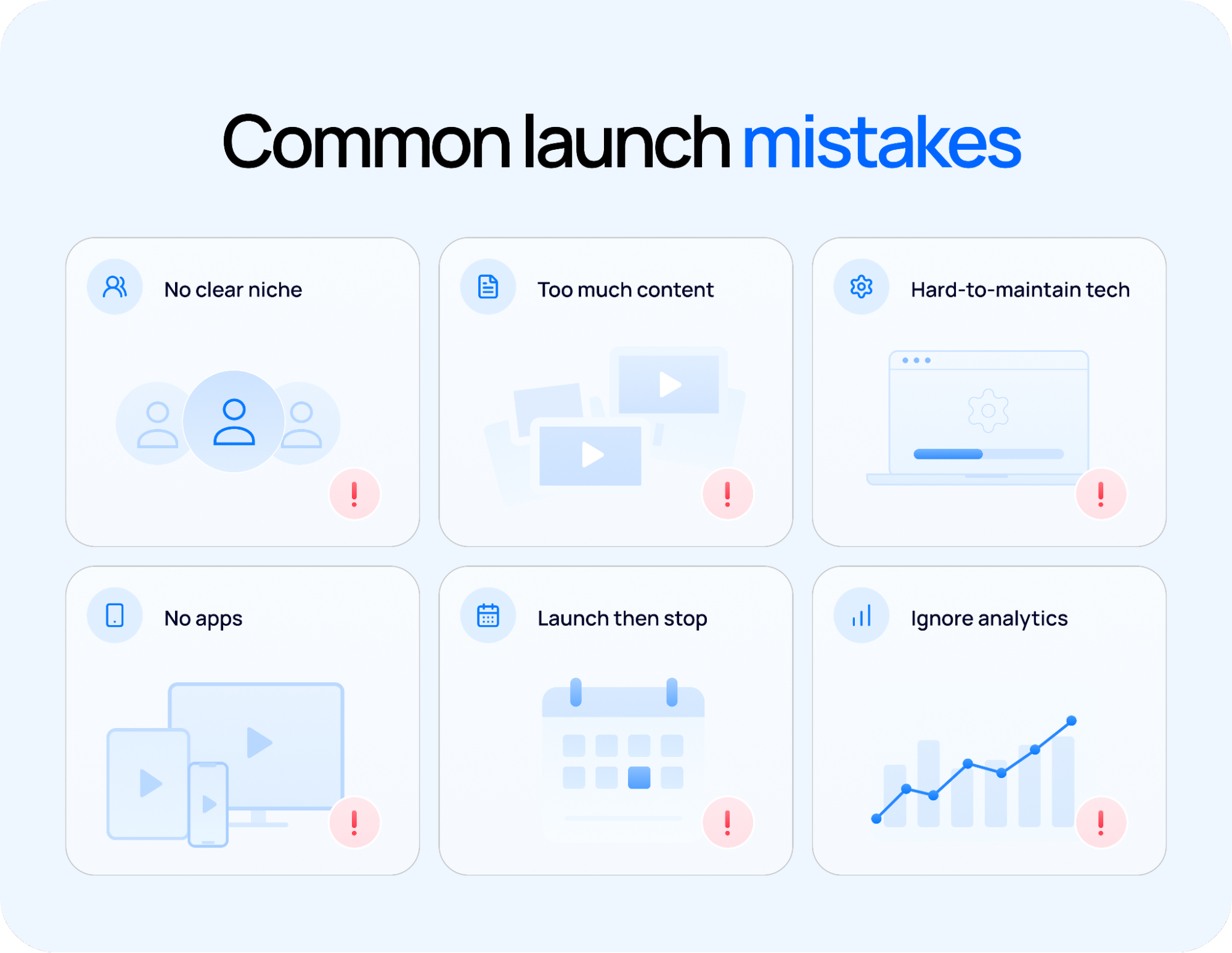
Common mistakes when launching a streaming service include picking too broad a niche, trying to build a large catalog before launch, and treating launch day as the finish line. Skipping branded apps, ignoring analytics in the first weeks, and choosing a tech route your team cannot maintain after launch are also common.
Watch for these six mistakes:
- Launching without a clear niche: A service for everyone gives no one a strong reason to pay. Without a niche, your videos and your marketing both become vague. Pick one topic and one type of member before you film anything, and use the research method in Step 1 to confirm that demand exists.
- Trying to match Netflix’s catalog: Netflix has thousands of titles because it serves a mass audience. A niche service does not need that. A small library of strong videos that solve problems is enough to launch. A steady release schedule then gives members a reason to stay.
- Picking a tech route you cannot maintain: A custom build needs developers long after launch, for fixes and app updates. Without that budget, things break after launch and stay broken. Choose a route you can run with the team you have today, and grow from there.
- Skipping apps your members expect: Many members want to watch on their phone or TV, and a website alone can feel limited. Mobile apps come with App Essentials at $499/mo plus $0.99 per subscriber ($449/mo billed yearly), and TV apps come with the Custom plan. Step 7 shows what each app type adds.
- Treating launch day as the finish line: Launch day is the start of your marketing. In the weeks after you open, keep posting free content and emailing your list. New members arrive through steady effort, and sign-ups drop when you stop promoting. Plan your first month of posts and emails before launch day.
- Ignoring your analytics: Your analytics show which videos members watch and which emails lead to sign-ups. Check them each week. If a type of video gets few views, make fewer of them. If a series keeps members watching, make more of it. Use what you learn to plan next month’s videos.
Launch your streaming service with Uscreen
Uscreen (opens in new tab) helps you start your streaming service in weeks and run it without a development team. Video hosting, your website, payments, email marketing, and live streaming all live in one dashboard. A 24/7 support team helps when members have questions. Members sign in with a link sent to their email, so they do not have to manage passwords.
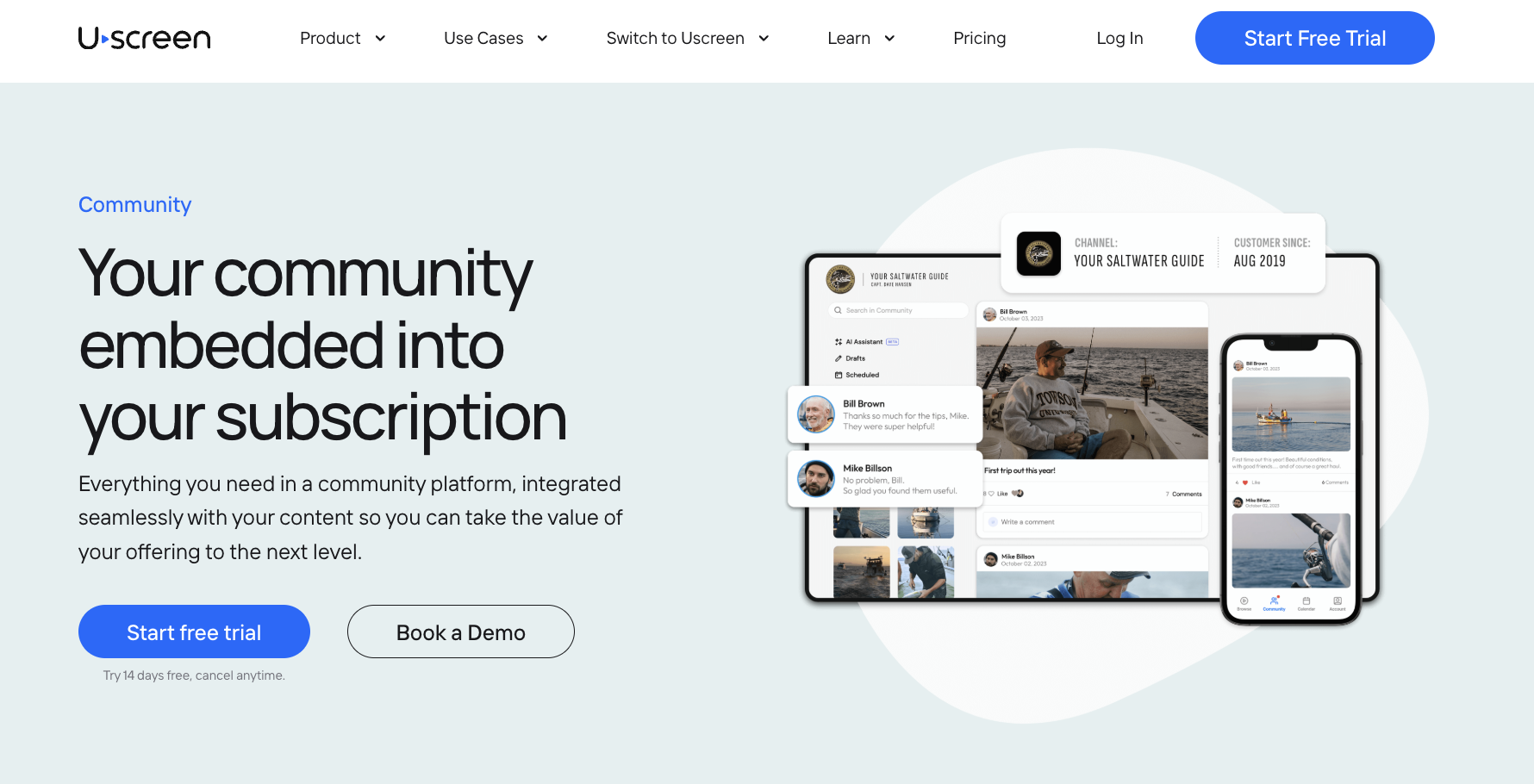
Community features (opens in new tab) , including channels, challenges, and direct messages, are part of the Custom plan. Uscreen customers using Community see 2x less churn, and 73% of community-engaged members remain active after three months, compared with 46% of members without community engagement.
Plans start at $49/mo on Starter. You can compare every plan on the (opens in new tab) pricing page (opens in new tab) or use the (opens in new tab) price my membership (opens in new tab) tool to set your own prices. For branded apps, you can (opens in new tab) book a demo (opens in new tab) .
If you already sell videos elsewhere, the Uscreen Migration team works with you to move your members, payments, and content on App Essentials or Custom.
Most payment methods carry over automatically. PayPal is the main exception, and the Migration team maps those members so the switch goes smoothly. Payment history and invoices don’t transfer.
Start your 14-day free trial (opens in new tab) .