Migration Guide
Your guide to migrating to Uscreen
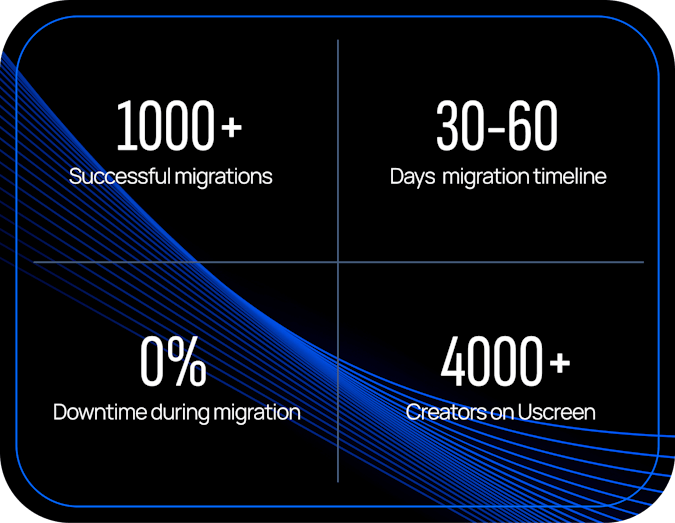
The right features are useless if you can’t switch with confidence. That’s why we make migration a priority, not an afterthought.
Here’s everything you can expect after signing with Uscreen.







What a Uscreen migration looks like
migrations under their belt, our team ensures your business continues to thrive throughout the migration process and beyond.
Uninterrupted service
Your content remains accessible and your members’ experience stays uninterrupted.
Expert handling
We manage all the heavy lifting for you, from bulk content transfers to intricate data mapping.
Tailored approach
We customize our process to your specific platform and needs.
Keep your paying members
We put your members first, ensuring your engaged members transition successfully to Uscreen.
Leave your migration to the experts
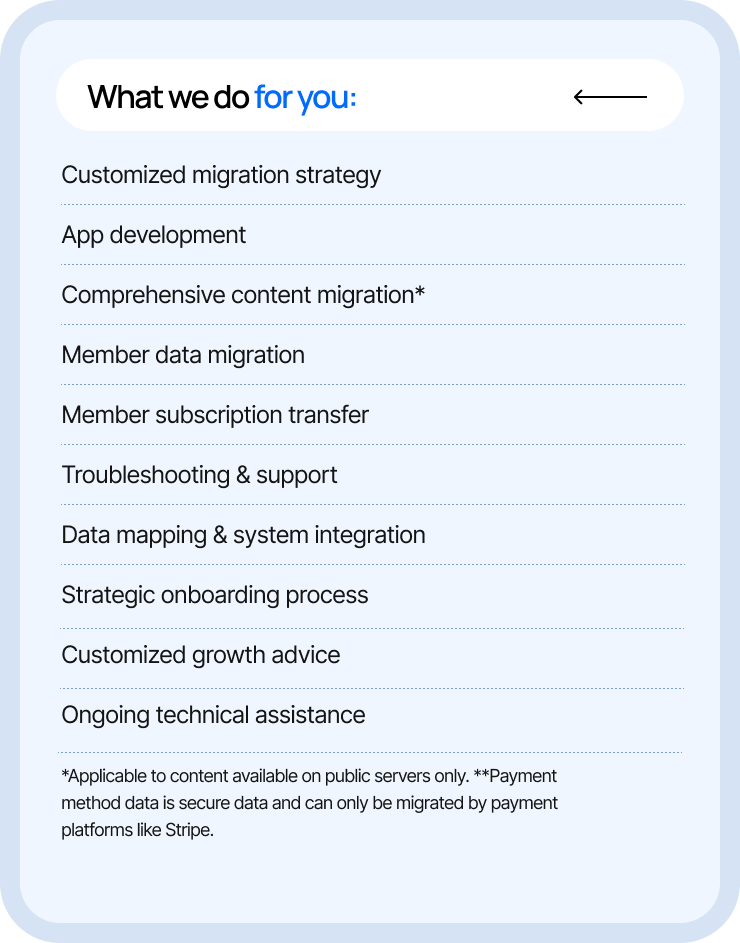
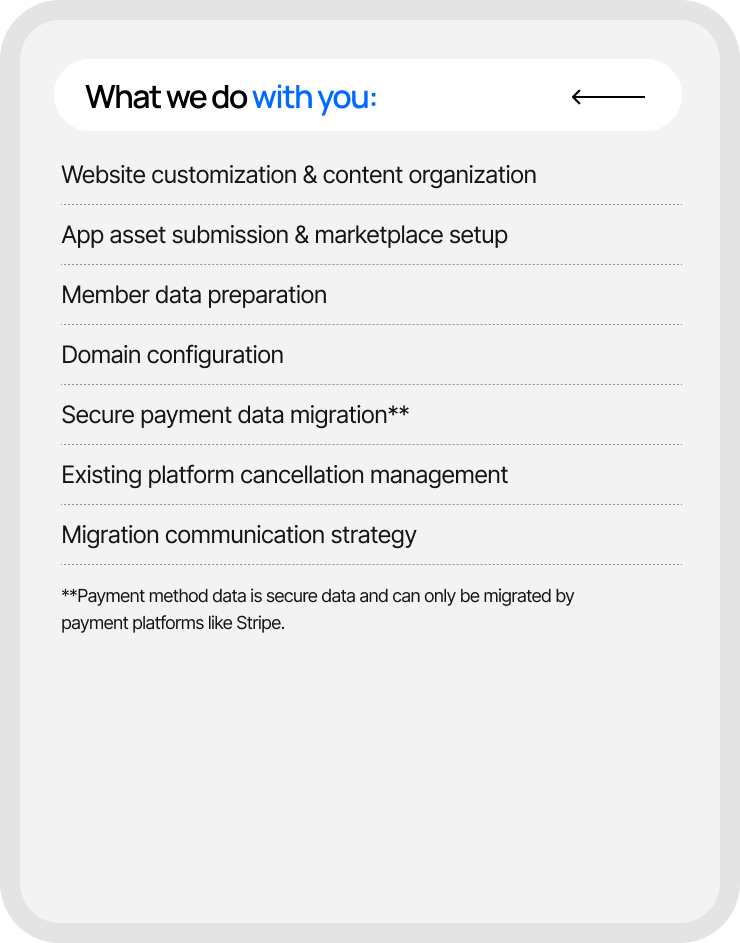
Our Uscreen migration team is here to support you every step of the way.From content transfers to long-term growth strategies, we provide comprehensive support to ensure your seamless transition and ongoing success on Uscreen.

Migration Timeline
Migration to Uscreen will take between 30 - 60 days (with 0% downtime) depending on which migration option you require. Below is the migration timeline to give you an idea of the process.
Website
30-day migration
*Timely communication and data provision are crucial for successful migration.
**Timeline is approximate and subject to change based on completion of critical tasks.
***Some manual handling of data may be required depending on the platform you’re migrating from.
Website & Apps
60-day migration
*Timely communication and data provision are crucial for successful migration.
**Timeline is approximate and subject to change based on completion of critical tasks.
***Some manual handling of data may be required depending on the platform you’re migrating from.
Website
30-day migration
*Timely communication and data provision are crucial for successful migration.
**Timeline is approximate and subject to change based on completion of critical tasks.
***Some manual handling of data may be required depending on the platform you’re migrating from.
Website & Apps
60-day migration
*Timely communication and data provision are crucial for successful migration.
**Timeline is approximate and subject to change based on completion of critical tasks.
***Some manual handling of data may be required depending on the platform you’re migrating from.
Steps
Account setup & website creation
- We'll have an initial call with a migration specialist.
- You'll set up your Uscreen website with key elements like catalog, login, and payment provider.
Content migration
- We'll transfer video content & existing metadata if files are on a publicly accessible server.
- You'll review migrated content, notify us of any needed corrections, and upload content if it's not publicly accessible.
Customer migration
- We'll format and migrate existing users, focusing on those with Stripe payments.**
- You'll provide end-user information and monitor any external data migrations.
Final migration & web launch
- We'll complete the final migration and report back to you.
- You'll finalize your website, verify content, install your custom domain, and communicate with end-users.
Account setup & website creation
- You’ll have an initial call with a Migration specialist.
- You'll set up your Uscreen website with key elements like catalog, login, and payment.
Content migration
- We'll transfer video content & metadata if files are on a publicly accessible server.
- You'll review migrated content and notify us of any needed corrections.
App asset submission
- We'll send you a Content Snare form for app asset submission.
- You'll gather and submit app assets, and set up developer accounts.
App asset review
- We'll review your app assets and notify you of any missing items or needed adjustments.
- You'll make necessary changes based on our feedback.
App Creation, Preview & Submission
- We'll build your app and submit it for your review.
- You'll have 5 business days for review and 5 more for iterations.
Customer migration
- We'll format and migrate existing users, focusing on those with Stripe payments.**
- You'll provide end-user information and monitor any external data migrations.
Final migration & web launch
- We'll complete the final migration and report back to you.
- You'll finalize your website, verify content, and communicate with end-users.
App launch
- We'll notify you when your app is approved and provide associated links.
- You'll determine the release schedule and promote your apps.
Here’s what customers say about our migration process
See why membership businesses just like yours have made the switch and haven’t looked back


Any time you switch platforms, there's a risk of losing members and we had a massive amount of content we wanted to migrate over. Uscreen provided the best solution for retaining as many members as possible during the transition, minimizing the impact. And that’s possibly because you guys have a great experience and a lot of potential when it comes to migrations.
Brendan Sweeney, CEO of Filmmakers Academy
$16K+
Monthly revenue
8% m/m
PAID SUBSCRIBERS
180%
Membership Growth


If I had done the migration myself, it would have been hundreds of hours. And I just wouldn't have done it. So I definitely appreciate all the help that Uscreen provided. I think that was one of the main reasons I said yes to moving my membership finally. Plus, with Uscreen, everything’s integrated—analytics, subtitles, community tools—so I can focus on creating content, not the backend.
Liz Kohler Brown, Founder of The Studio Membership
$75k
Monthly revenue
1,800+
Active Members
14%
Paid Member Growth
Why migrating to Uscreen is worth it
Making the leap to a new platform might seem overwhelming. But with Uscreen, it’s not just a platform switch–it’s a strategic leap forward.
Member experience
More premium member experience
- All-in-one experience: Members can access your content library, live streams, and community forums all in one place. Manage all your devices (web, mobile, & TV) from one backend!
- Intuitive video experience: Offer a Netflix-style catalog that makes content discovery a breeze. Our easy-to-search video catalog goes beyond other platforms, with filterable and searchable options, getting your content to your members faster.
- Native community building: Foster engagement with built-in community features that live right next to your video content. Our community tool is packed with features like video challenges, channels, and member-generated content.
- Seamless live streaming: Engage your members in real-time with our integrated live streaming capabilities, available on all plans for web and mobile. Go live in just 3 clicks with our native solution! We offer live chat for audience interaction during streams.
- High-satisfaction apps: Our 4.9-star rating on the app store speaks volume. With a smooth user experience and frequent feature updates, delighting your audience has never been simpler.
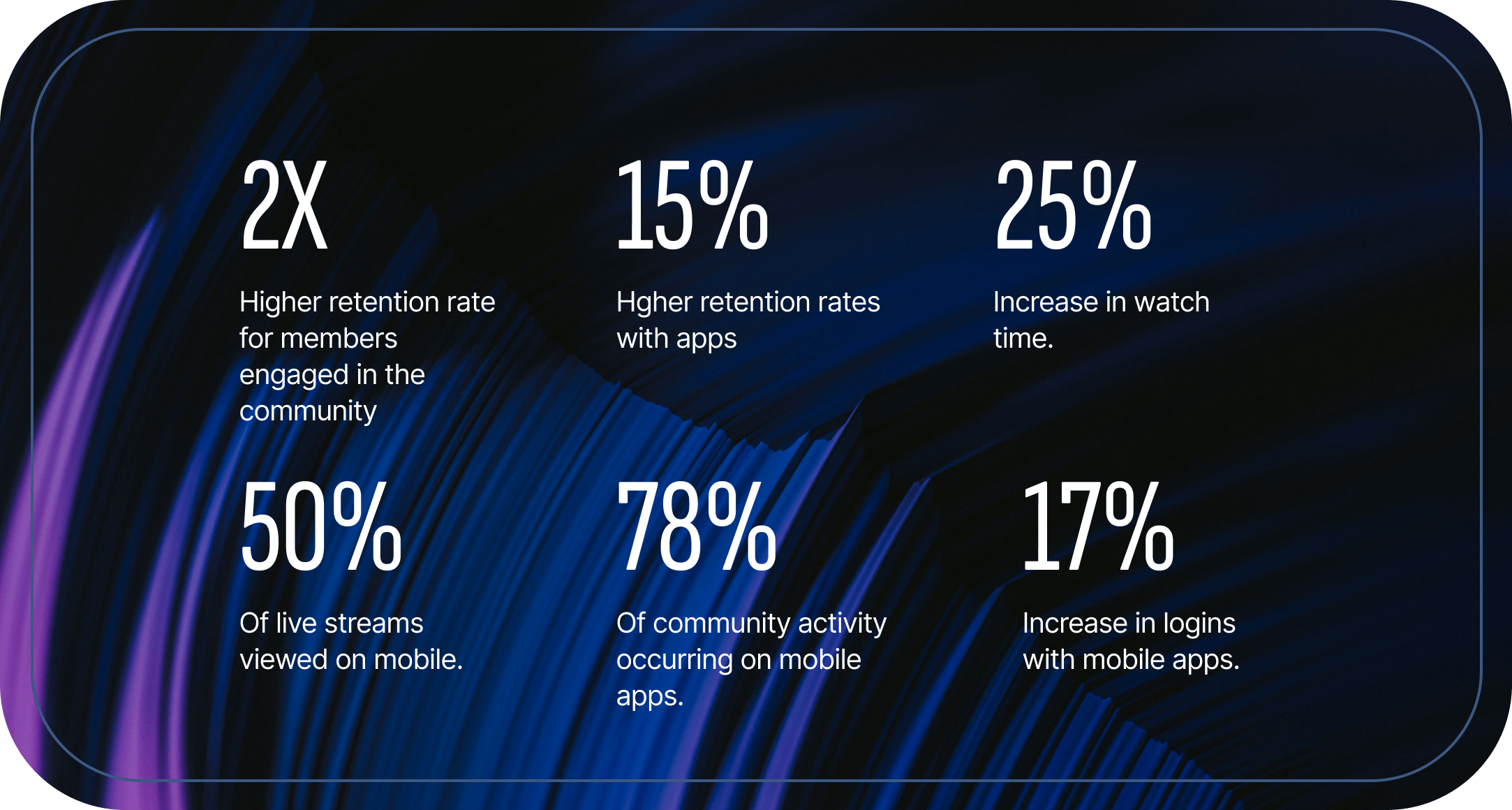
Here’s what our customers have seen after migrating to Uscreen:
Dedicated support
Dedicated support throughout your journey
- Expert migration team: We handle the technical details, migrating your content, member subscription information, and video metadata. We've helped over 1000 customers migrate their businesses to Uscreen.
- 24/7 support: Enjoy our round-the-clock support team for user, technical, and billing inquiries. We have a 30-minute response time for your inquiries and your member can also enjoy a quick 24h resolution time from our initial response.
- Personalized onboarding: Get a tailored introduction to the Uscreen platform with our Onboarding Specialists.
- Dedicated success manager: Receive ongoing strategic support with regular 1-on-1 calls throughout your time at Uscreen. This customized and consistent strategic support is unique to Uscreen.
- Trusted by customers: Our average customer rating on notable review platforms is 4.8 out of 5, with particular praise for our service and support.
- Membership+ community: Access 100+ resources on various strategy and tactic topics. Connect with like-minded creators and attend regular office hours.
Powerful engagement and retention features
Powerful engagement and retention features
- Native community: Create deep interactions between members, you, and your content with tools like polls, channel-like forums, and video challenges.
- Calendar: Create content and live stream calendars to keep your videos visible and members on track. Members can customize their own content calendars.
- Gamification: Encourage consistent engagement with watch streak incentives (coming soon).
- Personal playlists: Allow members to create customized video playlists.
- Offline downloads: Enable members to watch videos without internet access.
- Push notifications: Reach members directly on their mobile devices.
- Marketing tools: Built-in, set-it-and-forget-it tools like Giveaway Funnels, Abandoned Cart, and Reduce Churn features help you generate leads, acquire new members, and retain existing ones.
For fitness, wellness, or yoga businesses: - Music support: Let members play their own music or your curated playlist during videos.
- Apple watch app: Exclusive feature to track exercises and progress, motivating health-focused members. Uscreen is the only membership platform that supports Apple Watch App.
Scalable platform
Keeps you competitive and growing
- Reliable performance: We guarantee a 99.99% uptime for you and your members, with transparent communication about any maintenance.
- Continuous innovation to future-proof your business: With half of our team being developers, we release new features and improvements monthly, specifically catered to level up your apps.
- Multiple revenue models: Easily manage subscriptions, one-time purchases, and free content offerings. We offer tiered subscriptions and same-day payouts via native Stripe & PayPal integrations. Transparent and competitive pricing: With our competitive pricing and more plans to suit your needs, you'll get more for your money.
How does Uscreen compare?
See how Uscreen stacks as an end-to-end partner for your business.
Uscreen
Vimeo Streaming
Kajabi
Custom / DIY
Customer Reviews
G2
With over 2.5 million reviews, G2 helps businesses make informed decisions about their software purchases.
4.8
3.7
4.3
Trustpilot
Trustpilot is an online review platform that allows consumers to share their experiences with businesses by leaving reviews about products, services, or customer support.
4.7
1.2
4.4
Capterra
Capterra provides its users with the insights they need to find the best solutions for their business based on industry, size, budget and specific requirements.
4.8
4.6
4.4
Video Experience
Netflix-style video catalog
Intuitive catalog experience that matches Netflix and YouTube. Group videos into a series based on themes, topics or audience.
Additional fee
Multi-device live streaming
Go live directly from your web or mobile platform.
via plug-in
Built-in LMS
Create, deliver, manage online courses and quizzes, while tracking student progress and facilitating communication.
Additional fee
Advanced security
Advance video functionality
Inclusive of features like Auto Captions, Offline Viewing, and Play in background functionality
Native Apps
Native mobile apps
Android & iOS
Additional fee
Native TV apps
Roku TV, Apple TV, Android TV, Fire TV, and Samsung TV* *coming soon
Additional fee
Native Calendar
Customizable content calendar by you and your members.
Additional fee
Native Community
Community Challenges
Gamification feature to boost engagement & retention.
Native Community Channels
Organize discussions based on audience or topic and create knowledge bases for your members.
Direct Messaging
Creator-to-member, and member-to-member messaging functionality.
Currently Beta
Dedicated Support
In-house tech support (24/7)
Troubleshoot any tech, media, or billing problems with our support team. 30-minute response time.
Personal Success Manager
Get your own personalized onboarding specialist and customer success manager for customized strategic growth advice.
End-user support (24/7)
Focus on what you do best while we answer support questions from your members
Membership Tools
Advanced analytics
Dynamic data for your content performance, member behavior, and business that is filterable and exportable.
via plug-in
Growth & retention tools
Set up & go tools for lead gen, acquisition, and retention.
via plug-in
Multi-tiered subscriptions
Offer several subscription plans with different access levels.
Additional fee
Accept Paypal
Direct Stripe integration
Own your payment methods and get paid directly from your payment providers.
Frequently asked questions
Migrating can feel overwhelming, but we’re here to make sure you have all the answers you need.
Will I lose current members?
Every migration is a little different, however, most of our customers retain the vast majority of their existing subscribers, resulting in a higher-quality, more engaged subscriber base. We’ve designed the Uscreen migration process to keep things simple for both you and your members. Your members who previously subscribed through your website will be able to easily login with just their email. Your members who previously subscribed through your apps will be able to restore their account by confirming their email within the app.
Will you move my content over?
Yes, we handle the bulk migration of your video content. If you’re migrating from platforms with more manual processes (e.g., Kajabi), we’ll guide you through best practices to ensure everything transitions smoothly.
What does the migration process look like for my members?
Your members won’t even notice the migration happening. While we handle everything on the technical side, your platform stays live. When you're ready to launch, they’ll continue enjoying your video content without needing to sign up again.
What does the migration process look like for me?
We’ll take care of the tech side and guide you through communicating the exciting changes to your members. Our goal is to make sure they’re pumped about the new platform from day one.
Can you migrate community/video comments?
No, we focus on migrating the essentials—your video content and your members’ payment information. These are the cornerstones of your business, ensuring a smooth transition.
What type of members will you migrate?
We only migrate your paying members. This approach minimizes manual work and ensures a seamless transition for your most valuable members.
How will the launch work?
We’ll help you develop a communication plan to get your members excited about the new platform. While we handle the technical migration, you’ll keep things running smoothly. Post-launch, everything will be ready for your members to enjoy.
What do I need to do for the migration?
Your role is to keep your members in the loop and excited about the upcoming changes. Most of the heavy lifting is on us, especially if you’re migrating from platforms like Vimeo or Stripe.
Will you be able to migrate my members’ billing information?
If your members are on Stripe, we can migrate all their payment information with ease. For PayPal, the process differs, and we’ll recommend the best approach based on your audience's needs.