
If you’re a creator, juggling memberships, video content, and community discussions across multiple tools can create a fragmented experience for you and your members. One solution successful content creators use to simplify operations is platform consolidation.
Automations help with this by handling routine tasks, freeing you to focus on producing content and engaging your members. For example, creators using Uscreen’s automation features often see higher engagement, including more viewers, longer watch time, and increased community activity.
In this post, we’ll explore how platform consolidation can streamline your workflows, creating a seamless experience for your audience and helping you scale consistently.
Why creators consolidate platforms
Platforms like YouTube offer channel memberships for exclusive perks and content, but they don’t always provide community spaces or full control over monetization.
Many creators end up patching together multiple tools and workflows, which leads to overlapping features, inconsistent member experiences, and data scattered across different dashboards.
The extra complexity adds work for your team and makes it harder to retain and engage members.
![Scattered creator workflow next to a simplified, centralized workflow (creator to a single platform, clean link to audience).]](https://www.uscreen.tv/wp-content/uploads/2026/03/fragment-vs-consolidate-1055x1011.png)
Bringing everything onto a single platform streamlines operations, preserves the features that matter, and adds new capabilities to help your business grow steadily and scale predictable recurring revenue.
How platform consolidation works
If you’re managing memberships, video content, and community across multiple tools, consolidating onto a single platform can be complex.
Following some platform consolidation best practices upfront can make the process smoother and reduce headaches down the line. The following sections dive into each stage so you can tackle membership platform consolidation with confidence.
Platform audit
Start by taking stock of all the tools, platforms, features, and custom workflows you use. Lay out how everything currently works together so you can spot overlaps, gaps, or areas where a single platform could simplify.
Write down the steps your team and your audience follow, including how members interact with your content and tools. This makes it easier to smoothly migrate everything to a new platform while keeping your members’ experience consistent.
Feature mapping
After auditing your tools and workflows, the next step is deciding which features to keep and where a centralized platform can simplify or improve your process. Consider changes that will directly impact members, such as:
- New app availability (iOS, Android, or TV)
- Added or improved engagement features, like community discussions or live Q&A
- Access to new subscription or content bundles
It’s also a good time to review how your content is organized to make discovery easier and flag repetitive tasks you can automate.
Platforms like Uscreen help by automating key parts of the membership lifecycle, including onboarding, engaging active subscribers, recovering inactive users, and promoting content. For example, if a member becomes inactive, built-in email automations can reach out to re-engage them, saving you the time of exporting lists or managing separate email tools.
Keep your members’ experience at the center of these changes. The goal is to reduce friction and make it seamless for them to engage with your content and community.
Transition plan
Once you’ve decided what features to keep or adjust, create a clear transition timeline. Key steps include:
- Deciding if the migration will happen all at once or in phases
- Estimating how long the move will take based on content size and workflow complexity
- Planning how and when to introduce the change to your members
Be sure to give members advanced notice and multiple reminders of platform changes, so they have time to adjust. For content migrations, clearly communicate when items will no longer be available on the old platform.
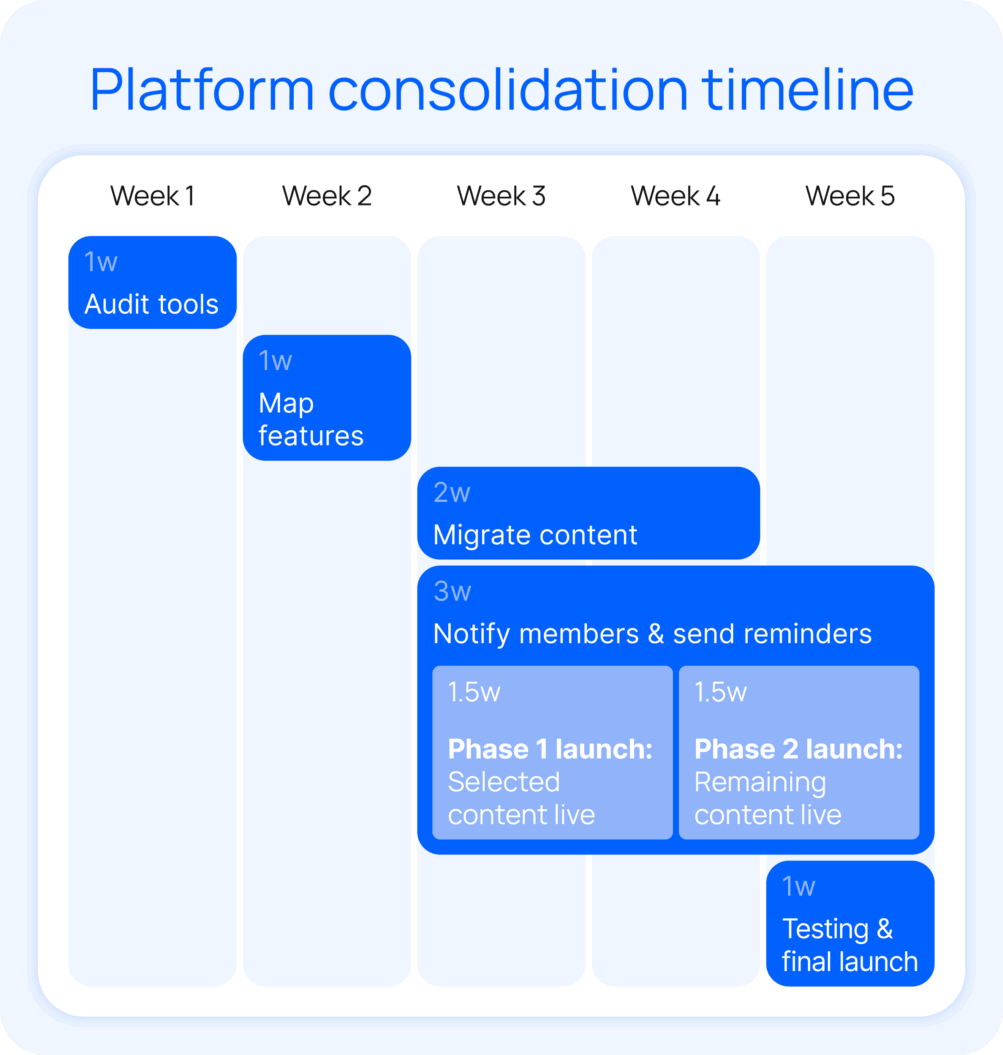
A well-planned transition keeps the experience smooth for members and reduces stress for your team.
Testing & quality assurance
As you roll out your transition, make sure everything is working as intended. Internally test all features and workflows before the migration is available to members, and check again after it’s live to ensure your team and members can navigate the new setup smoothly.
Use analytics and member feedback to see how the changes affect engagement and revenue. These check-ins are a key part of your video distribution strategy, helping you catch issues early and keep content delivery seamless for your audience.
Common concerns around consolidating
Moving everything onto a single platform can be a complex multi-step process, especially if you have established workflows and a large content library. With planning and the right support, the transition becomes far easier to navigate.
Before diving into specific concerns, here’s a quick overview of what you can gain and what to watch for when consolidating:
| Pros for creators | Challenges for creators |
| Streamlined workflows, reduced tool fatigue | Upfront time and effort to consolidate |
| Centralized content, memberships, and community features | Learning curve with a new system |
| Consistent branding and audience experience | Potential loss of specialized functionality if platform selection isn’t careful |
| Scalable revenue, subscriptions, and monetization | Temporary disruption for audiences during transition |
| Opportunity to retire outdated or redundant tools |
Losing niche features or community tools
Many creators worry about moving everything onto one platform, but consolidation doesn’t mean giving up what makes your membership unique. Platforms like Uscreen bring memberships, community features (like social profiles and community challenges), and video content together in one place while adding automation and engagement tools to make management easier.
Recreating content or workflows
Many creators worry that migrating content will mean rebuilding everything from the ground up, but the right membership platforms make the process quick and painless. With Uscreen, migration support specialists guide you through moving your content, helping maintain continuity and save time.
Disrupting member access
Creators often fear frustrating their members during the transition. Phased migrations, advance notice, and clear communication help keep access smooth and engagement steady.
Costs and resources for platform consolidation
Consolidating onto a single platform requires some upfront effort and investment, but over the long term, it simplifies operations and lowers ongoing costs by reducing the number of tools you pay for. Here’s a look at typical one-time and ongoing costs for the transition:
| Cost Type | Estimate | Notes |
| Migration & setup | $1,000 – $5,000 | Auditing tools, mapping features, and moving content |
| Internal team time | Variable | Testing workflows and communicating changes |
| Platform subscription (ongoing) | $119 – $400+/month | An all-in-one platform that replaces multiple tools |
| Tool consolidation savings (monthly) | $100 – $500+/month | The cost reduction from consolidating |
Using a membership platform is often cheaper and easier than building your own system from scratch or managing multiple standalone tools. While there’s upfront effort, investing in consolidation pays off with more efficient workflows and a smoother member experience.
Examples of successful consolidation
Many creators have improved workflows and member engagement by moving to a single platform. Here are two examples of successful consolidation in action.
Abundance+
After struggling with a patchwork WordPress setup and multiple plugins, creator Justin Rhodes consolidated his membership onto Uscreen to build Abundance+, a Netflix-style streaming platform for the homesteading community.

While I was evaluating my move from my traditional member program software, I needed something that people could consume easily on a phone, not just through a browser or so through an app. And they could easily consume on TV and something that tied and communicated those things so you could start something on your phone, pause, and eat dinner, finish it on your TV.
The results were transformative. Abundance+ now generates over $1M in annual revenue, supports 7,700 active members, and more than 76% of viewing happens through dedicated apps.
Filmmakers Academy
After struggling with a patchwork of tools and a custom backend, Filmmakers Academy consolidated its membership, video library, community, and marketing tools onto Uscreen.
The move replaced multiple platforms with a single system that their small team could easily manage, while also enabling them to launch streaming apps on Roku, Fire TV, Android, and iOS.

What I love most about Uscreen is the comprehensive backend feature set. It’s like playing an instrument—I manage push notifications, email broadcasts, upselling functions, and abandoned cart features all within the Uscreen platform. I no longer have to rely on a bunch of different plugins or sites to get things done…whether it’s our marketing team, editorial team, or operations—we can all access and manage the membership seamlessly.
Since migrating in 2021, Filmmakers Academy has grown its member base by 180%, attracting members from 96+ countries and maintaining an average 8% month-over-month growth in paid memberships.
Consolidate your platforms with Uscreen
Platform consolidation is a smart move if you want to simplify workflows and deliver the best experience for your audience. By centralizing content access, community tools, marketing, and monetization, you can focus on creating great content and growing your content creator income.
Uscreen makes this process easy with built-in automations for the entire membership journey. You can replace multiple platforms with a single system that saves time, keeps members engaged, and helps you build consistent revenue.
FAQs
How long does consolidation typically take?
Most creators complete consolidation in four to eight weeks, depending on content volume and features. A clear audit, feature mapping, and phased migration plan help you minimize disruption and start seeing benefits quickly.
Will I lose features or content during consolidation?
Careful planning and the right partner, like Uscreen, help prevent feature or content loss during migration. Before picking a platform, list the features, content types, and workflows you rely on so you can compare platforms more confidently.
How can I minimize audience disruption?
Communicate changes clearly and provide transition guides. Phasing your migration reduces confusion while Uscreen makes it easy to consolidate all your content, memberships, and community features in one platform.