Moving your membership platform can feel like a big step, especially after all the time and effort you’ve invested in creating content, growing your community, and building recurring revenue. While it’s normal to think about potential bumps along the way, the right platform migration strategy helps your members adjust smoothly and keeps your business on track.
In this guide, we’ll share practical insights and actionable steps from our migration experts to help you turn this transition into an opportunity to grow your digital content monetization.
The 3 pillars of a successful migration strategy
The key to a stress-free migration is having a solid plan that keeps your members happy and your business moving forward. Lyndsey Balfour, Head of Migrations at Uscreen, explains how that process typically unfolds:

In general, a migration can be broken into three phases. First is the discovery phase, where we’re asking questions about your current setup, how your content is stored, how it’s managed, and how your members and payments are handled. That step is really important because it shapes how the rest of the migration works.From there, we move into content migration and organization, and then finally into the end user migration, where members are moved over and, ideally, their subscriptions continue without interruption.
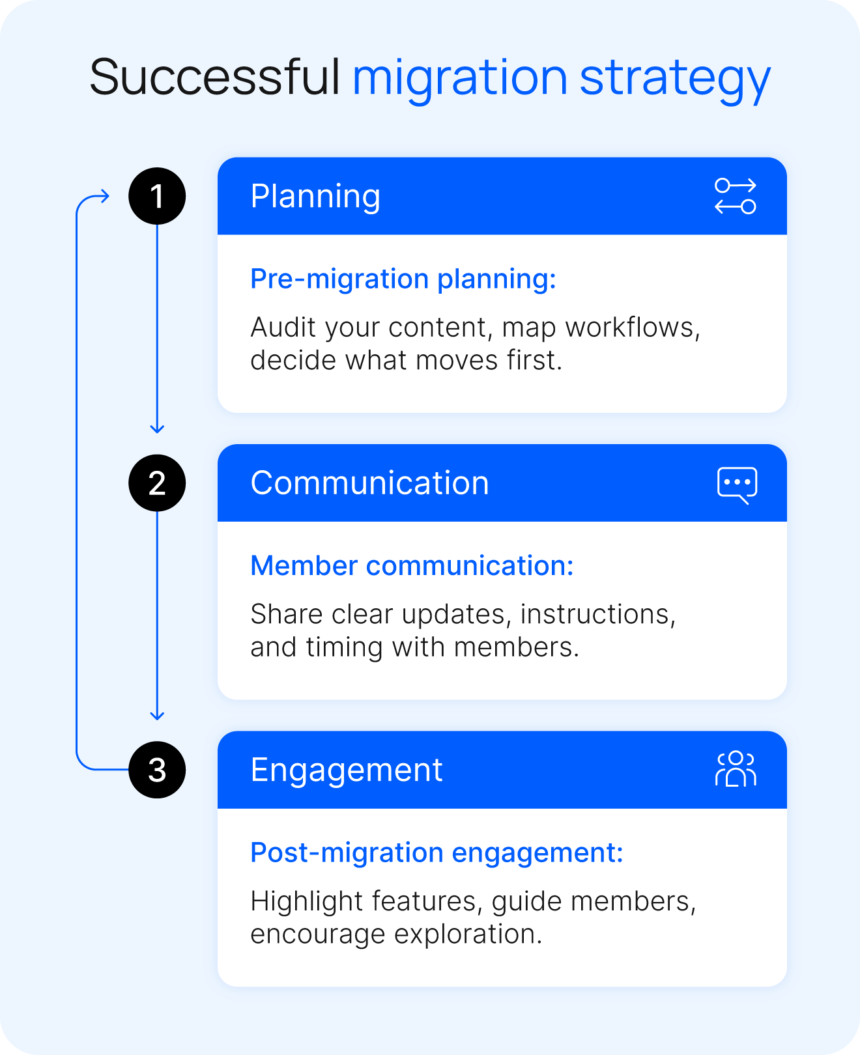
These three phases translate directly into a simple framework you can use to plan your own migration:
- Pre-migration planning: Get your content, tools, and workflows organized so the move is seamless.
- Member communication: Let your community know what’s coming, why it matters, and what they need to do.
- Post-migration engagement: Help members explore the new platform, find value quickly, and stay active.
Together, this approach keeps your migration structured from start to finish. Planning lays the foundation, communication guides members through the transition, and post-migration engagement helps them fully adjust while giving your business a stronger, more organized platform to grow from.
Pillar 1: Pre-migration strategy
Before you start moving content or members, take a step back and define what a successful migration looks like for your business. This stage is about setting a clear strategy to improve your members’ experience and streamline your process.
As you plan, you can build a platform migration checklist to guide you through each step. Thinking through your goals and potential friction points early helps you reduce churn risk and handle issues more proactively.
Define success beyond “migration complete”
A successful migration is ultimately about how well your members settle into the new platform and whether the change supports broader goals like growing memberships, increasing engagement, or driving usage of a new app experience.
To make this measurable, it helps to set clear objectives ahead of time, such as:
- 30-day retention rate after the move
- Percentage of members logging in during the first week
- Support ticket volume during and after migration
Setting these benchmarks early gives you a clear way to track how things are going for your members and your business. It also helps you avoid a launch-and-pray approach where results are unclear after the switch.
Understand your members (not just your content)
Before you move platforms, take time to understand who your members are, not just what content they’re accessing. A simple way to do this is by segmenting your list by engagement level so you can plan communication and support more intentionally.
| Member type | Description |
|---|---|
| Active daily users | Members who regularly log in, engage with content, and participate in your community. |
| Occasional visitors | Members who engage inconsistently, often returning for specific content or updates. |
| Dormant subscribers | Members who are still subscribed but rarely or no longer engage with your platform. |
Each group will experience the migration differently, so this helps you plan communication and support more intentionally. Dormant subscribers are the most likely to churn during a migration, especially if there are billing or login changes. Because they’re already disengaged, even small friction points can lead to cancellations.
Some churn from this group is normal. Often, it simply reflects inactive subscribers leaving, which gives you a clearer picture of your active audience and helps you focus your growth efforts on members who are actively engaging with your content.
Decide what not to migrate
A migration is a good time to review your content and decide what should move with you. Not everything needs to be transferred, as some videos may no longer fit your current strategy. Making these decisions early helps you move forward with a clearer, more intentional structure.
It’s always a good idea to keep a backup of your content stored externally during a migration. That way, you have a separate copy you can come back to if you want to reuse, repurpose, or reorganize anything later.
Once you know what you’re bringing over, the next step is thinking about how it will be organized. A migration is also a great opportunity to improve how members find and navigate your content.
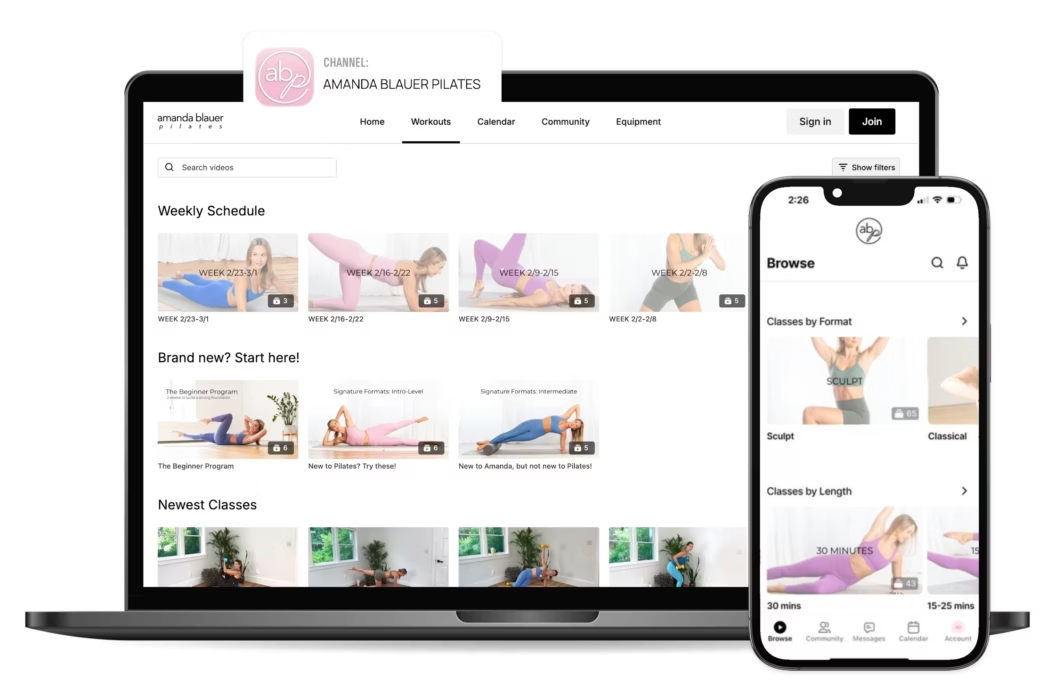
For example, on Uscreen, you can structure your library using titles, descriptions, and customizable filters so members can browse by topic, author, or category. A fast, direct search option also helps members quickly find what they’re looking for.
Identify risks before they happen
Most migration issues come from a few predictable friction points. Planning for them early helps you avoid disruption and keep the member experience smooth.
| Risk | What can go wrong | How to prevent it |
|---|---|---|
| Billing interruptions | Subscriptions do not transfer or renew correctly | Check payment gateways, subscription mappings, and recurring billing settings before launch |
| Password or login resets | Members are unable to access their accounts after the move | Test login and account access flows in the new platform and prepare reset instructions if needed |
| Broken links | Old links no longer lead to the right content or pages | Audit your most-used member links, such as your homepage, content pages, checkout, and account pages, then update or redirect them before launch |
Before going live, run a simple pre-launch check by stepping through the full member experience. Log in, browse content, and manage a subscription to make sure each step works as expected on the new platform.
Most migration risks come down to understanding how your content and customer data are currently set up. Where your content is hosted and how your payments are managed, whether that’s directly through Stripe or another system, can change what the migration process looks like. That’s why reviewing those details early is so important.
Pillar 2: Communication strategy
Once your migration plan is in place, the next step is thinking about how you’ll communicate it to your members. A clear communication strategy helps set expectations early, reduces confusion, and keeps your audience confident throughout the transition.
Effective communication is one of the biggest levers for reducing churn during a migration.
Why communication determines success
Most of the member anxiety during a migration comes from uncertainty about what’s changing and what they need to do next. When members feel unclear, they’re more likely to disengage. Clear, proactive communication helps remove that friction, builds trust, and turns uncertainty into confidence in the transition.
Sharing updates early and consistently also reduces pressure on your support team by answering common questions before they come in. It gives you a chance to guide members step by step through the process, reinforce the value they already get from your platform, and highlight any new benefits they’ll see once the new experience is live.
Effective communication during a migration can look like:
- Email marketing funnels that guide members from announcement through onboarding and reactivation
- In-platform messages guiding members through key steps like logging in or accessing content
- Simple how-to guides or walkthroughs showing what the new experience looks like before launch
The ideal migration communication timeline
A strong communication plan follows a clear rhythm. Mapping your messaging across the migration helps reduce confusion and sets expectations early, keeping members engaged throughout the process.
| Timing | Message | Purpose |
|---|---|---|
| 4 weeks before | The Big News | Announce the migration and focus on the “why,” what’s improving, and the benefits for members |
| 2 weeks before | The Sneak Peek | Give members a preview of the new platform experience, including key features or interface updates |
| Launch day | The Welcome Home | Provide clear, simple instructions for accessing the new platform and getting started immediately |
| 1 week after | The Check-in | Follow up to confirm access, answer questions, and gather early feedback |
It helps to treat this timeline as a set of planned touchpoints, rather than one-off announcements. Aim to prepare each stage in advance, so your messaging stays consistent and easy for members to follow.
What to say to your members
Across your migration communication, the goal is to keep things clear, consistent, and easy for members to follow. Members should always understand what’s happening without needing extra context or technical explanation.
The tone should be confident, helpful, and focused on guiding members through the change. Clearly explain what’s changing and what they need to do next, while reinforcing continuity around access, content, and billing so members feel secure throughout the transition.
In practice, every message includes:
- What’s changing and why it matters
- What’s staying the same, like access, pricing, or content
- What members need to do next, if anything
- When the change is happening
Keep messages focused on these core elements. This helps reduce confusion and ensures members always know what to expect.
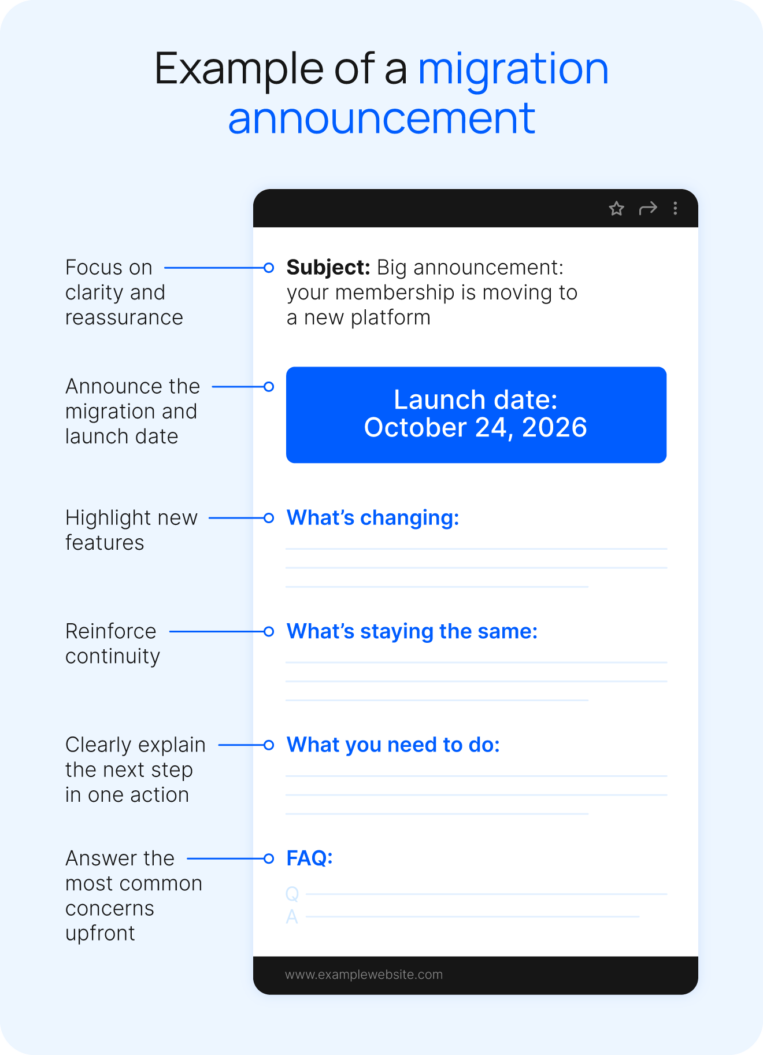
Tips for effective messaging:
- Keep each message focused on a single action or outcome for the member
- Use the same key instructions (like login steps) across channels to avoid confusion
- Build a simple FAQ once and reuse it across emails, in-platform messages, and support responses
How to handle churn fears
During a migration, churn usually appears in two forms: disengaged members leaving as expected, and involuntary churn caused by billing updates or payment re-entry during the transition. The second category is the one you can directly influence.
According to Lyndsey, “when you’re going through a migration, it’s normal to worry about churn. The reality is churn will happen regardless, and you can’t avoid it completely.
“The goal is to minimize it where you can and stay focused on growth. In some cases, trying to hold on too tightly to a small group of legacy members can slow down your ability to move forward and grow the new experience.”
To reduce involuntary churn, focus on making reactivation as smooth as possible so members can quickly restore access and update their details without friction:
- Prompt members to update payment details at first login on the new platform
- Send launch-day reminder emails with direct reactivation links
- Use simple, one-click flows for restoring access wherever possible
- Offer a limited-time incentive, such as a discount or bonus content, to encourage quick updates
- Follow up within the first week to capture anyone who missed the initial transition
A smoother reactivation process ensures churn reflects true engagement, not migration friction.
Pillar 3: Post-migration strategy
Your work does not stop once the migration is complete. The post-migration stage is where you turn a successful transfer into real momentum for your business and your members.
Retention strengthens, engagement builds, and new growth opportunities start to take shape across your platform.
The first 7 days are critical
The first week after migration sets the tone for how members engage with your platform long term. If members log in, explore content, and feel supported early, they are far more likely to stay active and build consistent habits on the new platform.
Drive activation during this period with simple, targeted touchpoints that encourage members to log in and explore what’s new, such as live sessions, improved navigation, and community features.
Activation tactics to use in the first 7 days:
- Launch a welcome challenge to encourage daily engagement
- Release an exclusive workout or piece of content only available on the new platform
- Host a live stream Q&A session to guide members through the new experience and answer questions in real time
- Highlight key features in-app or via email so members know exactly where to start
During this window, responsiveness is key. A visible and fast-moving support team helps remove friction quickly, answers questions as they come in, and keeps members engaged while new habits form.
Turn migration into a re-engagement campaign
A migration is a natural moment to reconnect with your broader audience. It gives you a clear reason to reach out to inactive members, past subscribers, and leads who didn’t convert the first time.
Instead of positioning it as a technical update, frame it as an upgrade to the overall experience. New features like mobile access, live sessions, or community tools can shift how people see the value, especially if they weren’t fully convinced before.
To turn this into a growth opportunity:
- Re-engage inactive members and past subscribers with a simple “we’ve upgraded” message
- Lead with what’s new and improved, not just that the platform has changed
- Offer a limited-time “grand re-opening” promotion to encourage people to come back
- Highlight the full experience, including content, community, and ongoing value
Uscreen’s built-in marketing tools help you do all of this without adding extra tools or work. You can segment your audience, target inactive or past members, and send automated sequences. Features like win-back offers and automated reactivation emails make it easier to recover members who would otherwise churn.
Shane Hurlbut, Founder of Filmmakers Academy, has experienced the impact of this kind of consolidation firsthand:

What I love most about Uscreen is the comprehensive backend feature set. It’s like playing an instrument — I manage push notifications, email broadcasts, upselling functions, and abandoned cart features all within the Uscreen platform. I no longer have to rely on a bunch of different plugins or sites to get things done.
This is more than a retention moment. Done well, it can bring back past members, convert new ones, and turn your migration into a meaningful growth driver for your business.
Learn more about membership toolsCollect feedback and iterate quickly
Once your platform is live, the focus shifts to understanding how members are actually using it. Short surveys, quick polls, and direct feedback requests can help surface friction points early, especially around login, navigation, or content discovery.
It’s also important to watch behavioral signals. An increase in support tickets, community comments, and repeated questions quickly shows where members are getting stuck or which groups may need more guidance. Patterns matter more than one-off feedback, so focus on recurring issues.
To decide what’s worth acting on, check for:
- Issues that affect a large portion of your members
- Friction points that block access, billing, or core actions like watching content
- Repeated feedback across multiple channels, not just a single complaint
- Anything that directly impacts early engagement or retention
Even after the migration is complete, you can continue using member feedback and behavior to make small, ongoing improvements that better align the platform with how they actually engage.
One example of this in practice is Cara Metz from Cara Fitness, who identified checkout friction for international members and reduced it by enabling localized pricing. The result was a smoother purchase experience and fewer support questions.
Small adjustments like these can make a meaningful difference by removing barriers at key points in the member journey.
Common strategic mistakes to avoid
Even with a strong migration plan, a few common issues can create avoidable friction for you and your members. Most challenges stem from treating migration as a purely technical project rather than a full member experience shift. They also come from not planning for how members will actually use the new platform day to day.
| Common pitfall | How to fix it |
|---|---|
| Treating migration as purely technical | Position it as an experience upgrade and guide members through what’s changing and improving |
| Under-communicating | Share clear, consistent updates before, during, and after launch so members always know what to expect |
| Overloading users with instructions | Keep messages focused on one clear action at a time and make next steps easy to follow |
| Ignoring mobile experience | Test the full journey on mobile, including onboarding, login, and content access, before launch |
| Not testing billing and access flows | Run full end-to-end checks for subscriptions, payments, and account access to avoid launch issues |
Over-communication is rarely a problem during a migration. Members respond better to clarity and repetition than uncertainty, as long as messages stay simple and consistent.
Timing also matters. Avoid launching during peak engagement periods or seasonal spikes in your niche, such as January for fitness creators, when activity and expectations are already at their highest.
Your migration should also align with your broader video distribution strategy, so content releases and audience engagement naturally support the transition rather than compete with it.
How strategy drives successful migrations
A migration is a technical process, but the strategy around it shapes the outcome far more. How you communicate, structure your content, and guide members through the change all play a direct role in retention and churn during the transition.
Uscreen handles the technical side of your migration so you can focus on creating the best experience for your members. With thousands of successful migrations behind us, we understand how to migrate platforms and keep the process smooth from start to finish.
We know migration can feel scary because it’s your business and your livelihood. Our goal is to make it as stress-free as possible by handling the technical side of it for you. That includes moving your content, helping structure your library, and supporting the transition so members don’t feel friction. We’ve done this many times before, so while it may feel overwhelming from the outside, we’re able to guide you through it with confidence.
Here are a few examples of creators who have gone through this process and used it as an opportunity to grow.
Filmmakers Academy
Filmmakers Academy migrated to Uscreen in 2021 after outgrowing a complex, patchwork setup that made it difficult to manage everything in one place. While the content migration itself was straightforward, the more nuanced work came from updating legacy systems like member credits and past purchases.
In migrations like this, the challenge is often how to handle existing member benefits in a way that supports current members and long-term growth. For Filmmakers Academy, that meant making clear decisions about how those credits would carry over while simplifying the structure moving forward.
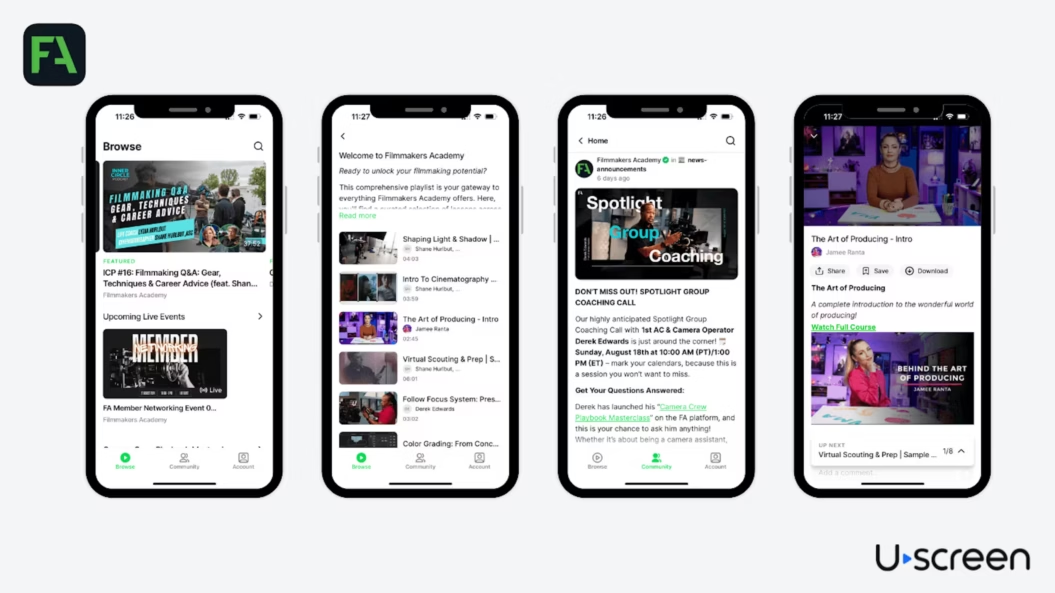
Since migrating to Uscreen, Filmmakers Academy has grown its member base by 180%, added thousands of members across 96+ countries, and launched apps on Roku, FireTV, iOS, and Android. With a more unified platform in place, the team focused on expanding content, improving the member experience, and driving sustainable growth.
Fittest Core
Fittest Core migrated to Uscreen in 2023 after outgrowing Vimeo OTT, where high costs, limited community tools, and poor content navigation created friction for their team and members.
While the migration itself was smooth, the bigger shift came from gaining clearer visibility into member activity, payments, and engagement through direct integrations like Stripe.

Using Uscreen on the backend has really improved how I control my processes. I can easily track and nurture leads, and the marketing features help convert them into members. The data is cleaner and easier to digest, which helps me quickly see what’s working and what isn’t. Overall, it’s a more functional and user-friendly experience for me.
This visibility gave Macy and Chase more control over the member experience. On their previous platform, much of this data was hidden, but with Uscreen, they could quickly see what was working and adjust for engagement and retention.
Since migrating, Fittest Core has grown 15% in monthly revenue, reached over 800 active members, and achieved ~58% engagement across their community and content.
Abundance+
Abundance+ migrated to Uscreen in 2021 after outgrowing a patchwork WordPress setup that relied on multiple plugins and third-party tools to manage video, payments, and community. As the membership scaled, this fragmented system created friction across the member experience, particularly around cross-device viewing, TV access, and overall usability.
Moving to Uscreen allowed Justin Rhodes to consolidate his platform into a video-first platform. Native apps and a unified community reduced friction for members and created a seamless “Netflix-style” experience while simplifying operations behind the scenes.
Since migrating, Abundance+ has grown to $1M+ in annual revenue, reached 7,700 active members, and achieved over 76% app viewership, establishing a scalable foundation for continued growth.
Ready to migrate without risking your membership?
A successful migration starts with a clear strategy. That strategy guides the technical execution, from member communication to reducing friction and maintaining engagement throughout the transition.
When the member experience leads the process, migration becomes an opportunity to strengthen your business and consolidate your creator tools for long-term growth.
At Uscreen, we handle the full migration end-to-end, including content, users, subscriptions, billing, and app setup across web, mobile, and TV. Partnering with us helps you make a smooth transition with no downtime.
Connect with our migration team to learn more.

Platform migration strategy FAQ
For members, platform migrations mean adjusting to a new way of accessing your content, including:
Logging in differently
Navigating a new layout
Interacting with new features
These changes can introduce friction, especially around login or billing updates, which may lead to involuntary churn if not handled carefully.
To reduce that risk, communicate changes clearly and early, provide simple step-by-step instructions, create quick guides for key updates, and encourage members to test the new platform ahead of launch with small incentives.
Focus on making the experience smooth and predictable for your members. Plan the transition carefully, highlight what’s staying the same versus what’s changing, and be ready to respond quickly to questions or issues as they arise.
Migration timelines vary depending on the size of your membership and the complexity of your setup. What matters most is keeping the process organized, giving members clear guidance, and pacing the transition so they can adjust without frustration.
The five R’s are Rehost, Refactor, Revise, Rebuild, and Replace. They guide how you move your content and membership:
Rehost: Move as-is, make sure it still works for members.
Refactor: Small improvements to structure or experience.
Revise: Update content or programs during the move.
Rebuild: Recreate programs carefully for clarity.
Replace: Swap old systems or content and explain the benefits.
Using the five R’s helps you plan a smooth migration and keep members engaged.
Reach members where they already engage with your content, such as email, your current platform, or in-app messages. Share clear guides that explain what is changing, any steps they need to take, and the benefits of the new platform. Repeating the message helps members feel confident and ready for the transition.
Not necessarily. Use the migration as a chance to evaluate your content and focus on moving the pieces that add the most value for members.
Content you don’t plan to host on the new platform can be stored elsewhere, like an external drive, if you want to keep it for reference or future repurposing. This keeps your new platform organized and gives you a chance to refresh older content for better engagement.