There are two things we feel strongly about at Uscreen.
First, that ownership is a right for creators. That includes your audience, your payments, your data, and your direct relationship with your members.
Second, that building a custom video membership platform is rarely the right move if you care about growth, cost, stability, and member experience.
Custom is often sold as “full control,” but in practice it usually means more systems to maintain, more technical risk, and more ongoing costs as your membership scales. We’ve seen creators spend months or years building DIY platforms, only to return later looking for something to stabilize, simplify, or replace what they built.
In this article, we cover:
- What building a custom video membership platform actually looks like in practice
- The hidden costs and long-term risks most creators underestimate
- How a dedicated platform like Uscreen helps eliminate these risks and operational burdens
- A real example of a creator business that outgrew a DIY platform and what changed after migrating
The goal isn’t to tell you which platform to choose. It’s to help you avoid a path that often looks like the “dream solution” upfront, but rarely plays out that way once the business is live.
The reality of building a custom membership platform
A custom solution for a membership platform is rarely ever a single system.
In practice, it’s an ecosystem of tools, integrations, and custom code designed to replicate what a video membership platform like Uscreen does out of the box.
Most custom setups include:
- A custom-coded website or member portal (often WordPress-based)
- Third-party video hosting and infrastructure (AWS, Mux, Vimeo Enterprise)
- Separate tools for payments, CRM, email, analytics, and automations
- Mobile or OTT apps built by agencies or freelancers
- Scripts, Zapier workflows, and manual processes holding it together
- Ongoing reliance on developers for fixes, updates, and maintenance
On paper, this looks flexible. In reality, it introduces permanent complexity and perpetually high costs.
The perceived advantages of DIYing your membership
The motivation to build your own platform is understandable.
You want control over your workflows. You want to design an experience that matches your business exactly. You want to own your code and avoid being boxed in by a platform.
Early on, a DIY setup can also appear cheaper. You may already be paying for hosting, payments, and email tools, so adding a few integrations feels manageable.
But these assumptions tend to break down right as your business starts to grow, often when it’s too late to back out.
The hidden costs of building your own platform
1. Total cost of ownership grows quickly
Custom platforms are expensive to build and expensive to keep alive.
Custom costs vary widely depending on scope, but based on what we’ve heard directly from creators who explored custom builds (and the quotes they received), a full platform that includes web and apps can cost upwards of $500k before launch.
After that, ongoing maintenance typically runs $20k to $50k per month across engineering, QA, DevOps, infrastructure, and app updates.
→ Every new idea requires developer time.
→ Every bug requires investigation and fixes.
→ Every platform update (iOS, Android, TV) triggers rebuilds.
All of which add up to expensive billable hours.
There is no “maintenance-free” phase.
When assessing an all-in-one video platform like Uscreen, you’ll want to factor that into your cost analysis.
2. Building slows you down over time
A custom platform can take 6–18 months to reach parity with what a dedicated platform already offers you out of the box.
After launch, the work shifts from building new value to keeping the system running. App store requirements change. Security standards evolve. Infrastructure needs ongoing attention.
As time goes on, more of your effort goes into maintaining what already exists instead of improving your product or growing your audience.
3. The member experience becomes fragile
When your platform is stitched together from multiple tools, your members feel it. They often experience:
- Multiple logins
- Inconsistent branding across tools
- Integrations that break silently
- Edge cases that appear on specific devices or browsers
Over time, this friction impacts engagement and retention, even when the content itself is strong.
On Uscreen-powered platforms, subscribers show exceptional loyalty, with 92–93% monthly retention. Over half of paying subscribers stay for six months or more, and more than 30% remain subscribed for over a year.
4. Your business becomes a tech company by default
As your platform grows, your focus shifts.
Instead of spending time on content, marketing, and audience growth, you spend time:
- managing developers,
- prioritizing fixes,
- troubleshooting systems.
Over time, technical debt slows development, increases bugs, and makes even small changes more expensive and risky than expected.
In the end, running the platform becomes a job of its own, often one you never intended your business to take on.
5. Scaling introduces real operational risk
As your audience grows, the complexity of your membership platform grows with it.
Video delivery, encoding, payments, analytics, and apps all need to scale reliably. With a custom solution, the responsibility for that scale sits entirely with you.
You’re looking at everything from major outages to failed payments to broken experiences that are difficult and costly to fix under pressure.
It’s really not worth it.
And in the end, you’ll end up migrating to an all-in-one platform anyway to save your business.
That’s what Justine Rodes did with his creator business, Abundance+.
A real life example: How Abundance+ faced a broken tech stack and poor member experience on their DIY platform
Before moving to Uscreen, Abundance+ was run on a WordPress-built membership site with a patchwork of plugins and third-party tools. That setup quickly became a problem because:
- The tech stack was fragile, with multiple plugins and tools that did not work well together
- Each integration added complexity and more opportunity for things to break
- Members could not easily switch between devices or enjoy a seamless viewing experience
- There was no way to deliver a Netflix-style experience across phone, tablet, and TV
Those limitations made the membership frustrating for members and costly to maintain for Justin Rhodes, founder of Abundance+.
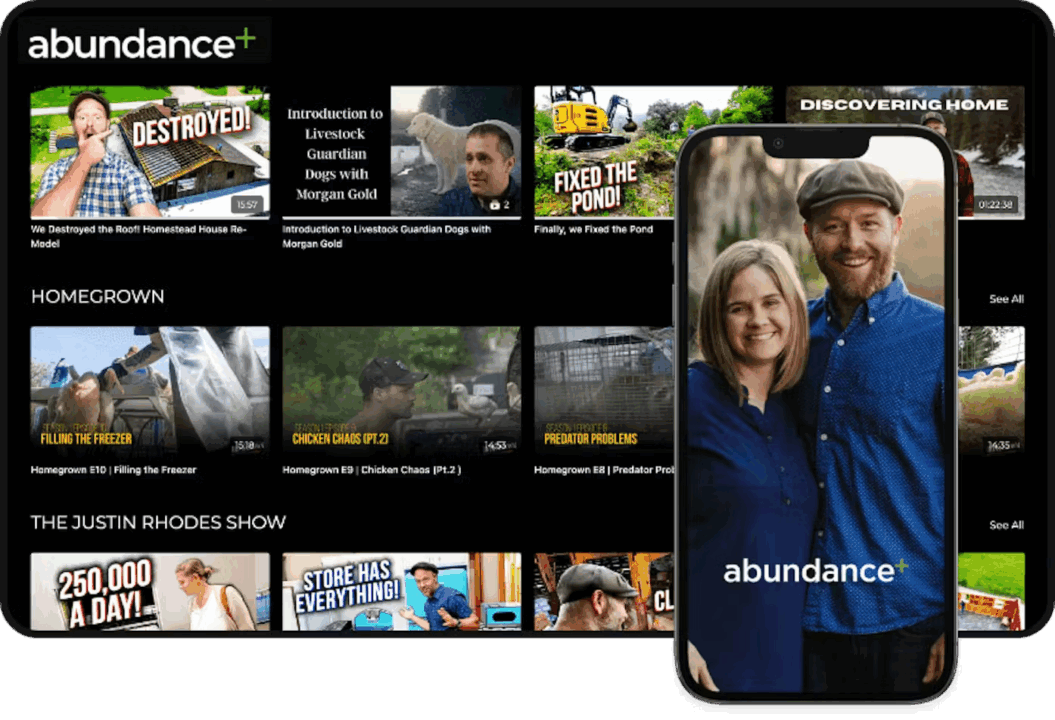
Abundace+ eventually moved to Uscreen because the old stack could not scale
Justin researched other platforms and chose a dedicated video monetization platform that included built-in apps and seamless cross-device continuity – Uscreen. After the move:
- The technical overhead dropped dramatically
- Members could watch content on six different devices, including iOS, Android, and TV
- The member experience became reliable and intuitive
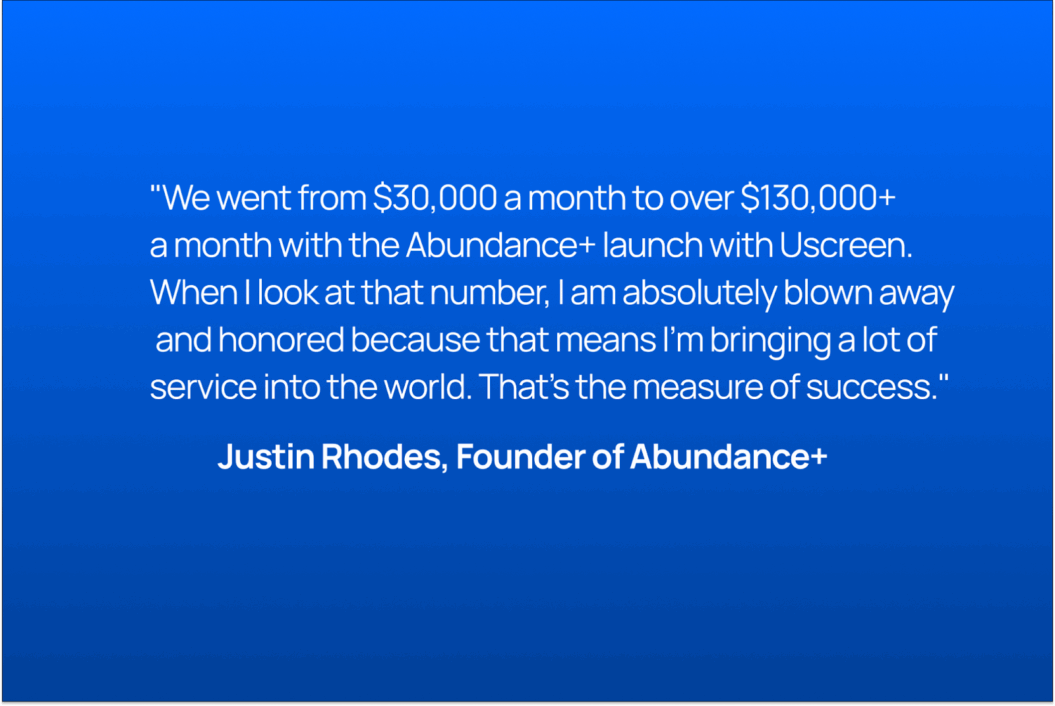
- The business saw measurable growth in revenue
As Justin explains:
👉 Read the full Abundance+ story here.
What a platform like Uscreen replaces for you
When you compare a custom build to a platform like Uscreen, the difference shows up in cost, responsibility, and ongoing operational load.
A custom solution requires everything we listed for you above: a large ecosystem of tools for video delivery, livestreaming, apps, community, billing, analytics, and marketing… along with hiring developers and managing ongoing maintenance to keep everything working.
A dedicated video monetization platform consolidates these requirements into a single system that is maintained, updated, and supported for you so you can focus on what you do best: running your creator business.
While there are many tools that position themselves as “all-in-one,” very few are truly comparable. Uscreen is built as a complete, end-to-end platform for video membership businesses and continues to evolve rapidly to support creators as they grow.
Uscreen vs Custom: A realistic cost comparison
The financial difference between a custom solution and Uscreen is significant from day one.
| Custom Build | Uscreen | |
| Initial build | Varies by build, often upwards of $500k | $0 setup fee; included in your total contract price |
| Maintenance | $20k–$50k/month | Plans start at $149/month, but range on average between $5k-$20k a year for creators who need apps. |
| Apps (iOS, Android, TV) | $150k–$400k per app + updates | ✅ Included in most plans, with setup, launch, and ongoing maintenance. |
| Video Infrastructure (hosting, encoding, CDN) | AWS, Mux, Vimeo Enterprise | ✅ Included |
| Community, CRM, Email Tools | HubSpot, Circle, Mailchimp | ✅ Included |
| Support | Build internal team | ✅ Included (end-user support + 24/7 tech support, dedicated Success Manager, onboarding, migration, and coaching) |
A truly all-in-one experience for you and your members
Instead of stitching together multiple tools, Uscreen brings everything into one cohesive system. You get a professional video catalog, built-in community, native live streaming, flexible monetization options, automations, and marketing tools designed to work seamlessly together.
Monetization is centralized and easy to manage. Subscriptions, pay-per-view content, courses, donations, and one-time purchases all live within the same platform. This creates a smoother experience for both you and your members while supporting recurring and one-time revenue growth.
For your audience, the experience feels simple and intuitive. Members log in once and move effortlessly between your content library, community, live events, and calendar. Everything is fully branded, consistent, and designed to feel like a single destination rather than a patchwork of tools.
Built to scale with you
Custom solutions become more expensive and fragile as you grow. Every new idea or update often requires developer time, additional integrations, and higher infrastructure costs.
Uscreen scales automatically, whether you have hundreds of members or hundreds of thousands. Video delivery, apps, infrastructure, and performance are handled for you, allowing you to launch quickly, grow confidently, and keep costs predictable as your business expands.
The platform continues to evolve alongside your business. New features are released regularly based on creator feedback, ensuring you always have access to modern tools that support growth and retention.
Powered by Uscreen, owned by you.
Ownership can become complicated with custom setups. Data lives across multiple tools, payments flow through different systems, and the audience experience is fragmented.
With Uscreen, you own your content, your audience, your data, and your payments. Your membership site and apps are fully branded, reinforcing your identity and strengthening long-term loyalty. Your members interact only with your brand, not third-party platforms.
An In-House Support Experience That Feels Like a Partner
Uscreen provides a complete support ecosystem from day one:
- Onboarding specialists guide your set-up and launch,
- A dedicated Success Manager supports your long-term growth,
- 24/7 technical and end-user support helps keep your business running smoothly.
- Expert coaching to help you launch and grow your business quickly and successfully
- Migration support for a seamless transition
- Access to Membership+, Uscreen’s coaching hub and customer community
And that’s why we always strongly advise against building your own platform
Whether or not Uscreen is the right fit for you comes down to your business model, your goals, and what you are trying to sell.
But Uscreen or not, we have never seen building a video monetization platform from scratch work out the way content creators and video entrepreneurs expect it to.
Leave the platform infrastructure to the professionals so you can focus on creating content, growing your audience, and building revenue.
The economics, operational burden, and long-term risk consistently outweigh the perceived benefits. Over time, many creator business owners end up looking for a platform anyway, often after significant investment and complexity have already accumulated.
FAQs creator business owners ask when choosing between a membership platform vs a custom solution
Q: “My members are used to my current setup. How can I avoid losing people if I change platforms?”
What matters most is not replicating every button. It’s delivering a seamless, reliable experience that keeps members coming back. DIY stacks often introduce friction through inconsistent branding, broken integrations, and tool seams that users feel.
A unified platform tends to improve the overall experience because everything works together in one branded environment across devices, with dedicated migration support to help make the transition seamless.
Q: “I rely on a very specific feature that I already built myself. How would switching platforms affect that?”
If a specific feature has been central to your business, it makes sense to protect that. The long-term issue is that one-off features are rarely “one and done.” Keeping them running usually adds complexity, slows you down, and makes scaling harder.
A dedicated platform gives you the core functionality most creator businesses need fully integrated, including video hosting, community, monetization, live streaming, analytics, and apps, with new features and improvements released monthly.
Q: “Won’t my users struggle to learn a new platform if I move everything?”
Platform changes can feel intimidating, but in practice, a unified experience is often easier for members than navigating disconnected tools. When everything lives in one place, confusion goes down, not up. With guided onboarding and migration support, creators can move platforms in a way that feels structured and manageable for both them and their audience.
Q: “I’m already stretched thin. How realistic is it to migrate without it taking over my time?”
We know migrating to a new platform can feel overwhelming. With Uscreen, you’ll have a dedicated Migrations team designed to help you every step of the way during your migration. Whether it’s via scheduled calls or email, they are there to answer your questions, provide guidance, and help you move forward with confidence from start to finish.
Q: “Your pricing seems higher than what I’m paying now. How should I think about the real cost comparison?”
Most DIY and low-cost setups look cheaper on paper because the costs are distributed across developers, third-party tools, hosting, maintenance, and support. Once you factor those in, the total cost of ownership is often higher than expected.
A platform price is easier to evaluate when you compare it to the full cost of maintaining a custom stack, especially as your business scales and those costs become harder to predict.