





How migrating from Kajabi to Uscreen works
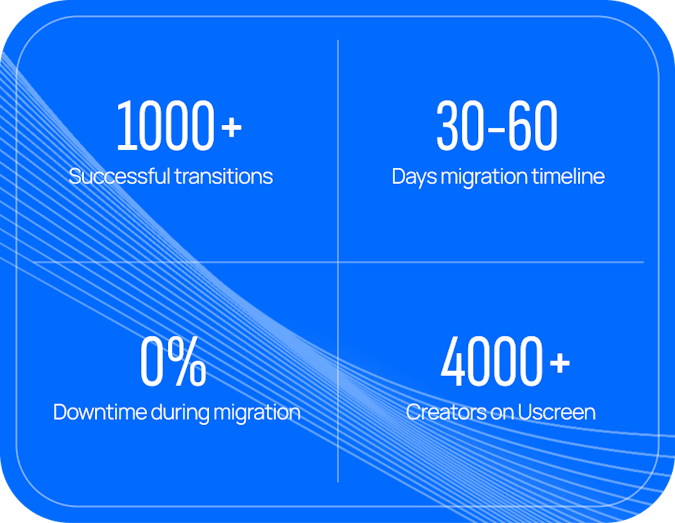
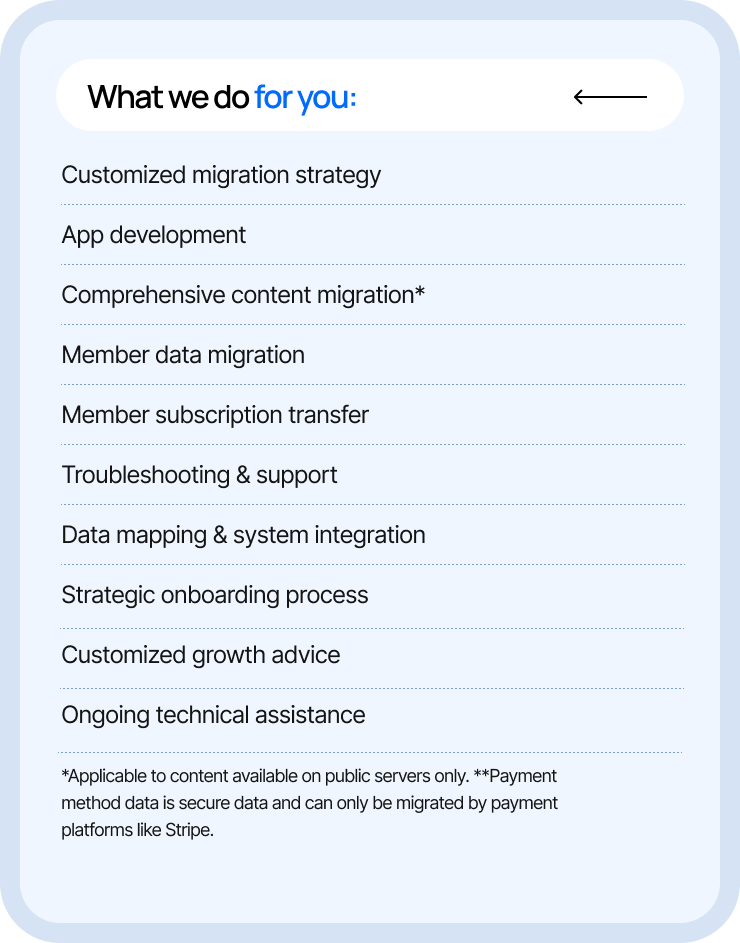
Our dedicated Migrations team moves you onto Uscreen, so you don't do it alone. We review your Kajabi setup, build a custom plan, then transfer your content, members, and payment data on a managed checklist. During all this process, your members keep access without re-registering, and you can go live with us in 30 to 60 days.
What a Kajabi-to-Uscreen migration looks like
Our team helps you move forward with clarity and confidence, so your business keeps growing through every step.
Hassle-free migration
Your content remains accessible and your members’ experience stays uninterrupted.
Expert handling
We manage all the heavy lifting for you, from bulk content transfer to intricate data mapping.
Tailored approach
We customize our process to your specific needs and Kajabi's requirements.
Guided member transition
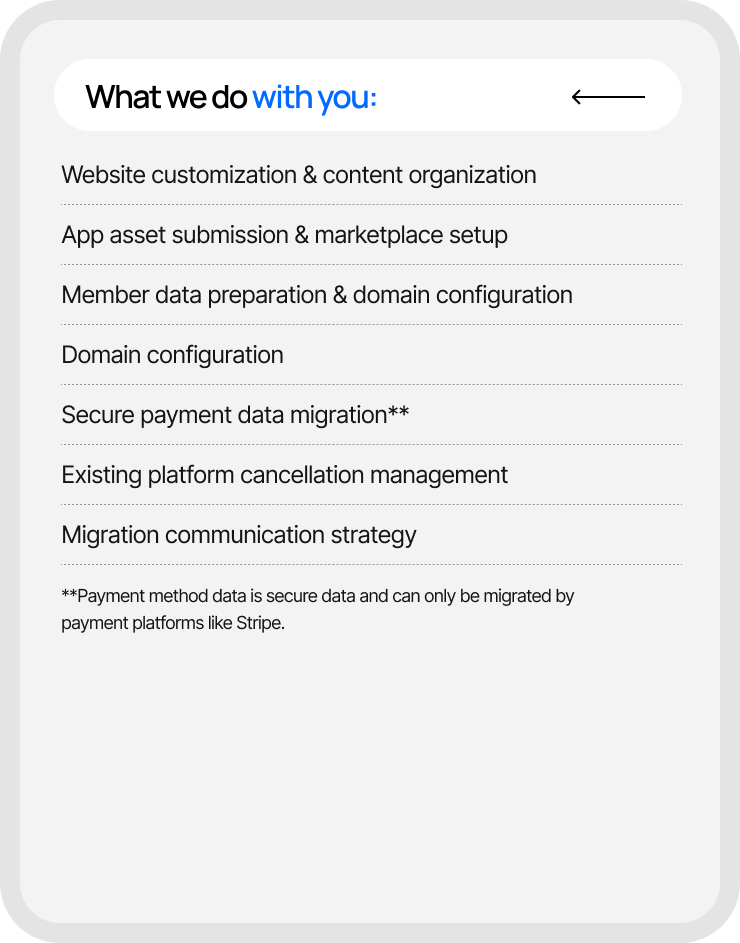
Our team breaks down the data, manages member transition on your behalf, and guides you through specific platform considerations. No re-registration for your members required.
Meet the experts behind your migration
Our migration team supports you through every step, from content transfers to growth strategies. We make sure your move from Kajabi is hassle-free, strategic, and sets you up for long-term success on Uscreen.

Migration Timeline
Migration to Uscreen will take between 30 - 60 days (with 0% downtime) depending on which migration option you require. Below is the migration timeline to give you an idea of the process.
Website
30-day migration
*Timely communication and data provision are crucial for a successful migration.
**Timeline is approximate and subject to change based on completion of critical tasks.
***Some manual handling of data may be required depending on the platform you’re migrating from.
Website & Apps
60-day migration
*Timely communication and data provision are crucial for a successful migration.
**Timeline is approximate and subject to change based on completion of critical tasks.
***Some manual handling of data may be required depending on the platform you’re migrating from.
Website
30-day migration
*Timely communication and data provision are crucial for a successful migration.
**Timeline is approximate and subject to change based on completion of critical tasks.
***Some manual handling of data may be required depending on the platform you’re migrating from.
Website & Apps
60-day migration
*Timely communication and data provision are crucial for a successful migration.
**Timeline is approximate and subject to change based on completion of critical tasks.
***Some manual handling of data may be required depending on the platform you’re migrating from.
Steps
Account setup & website creation
- You’ll have initial calls with Onboarding and Migrations specialists.
- We'll guide you through your migrations plan while you set up your Uscreen website.
Content migration
- We'll provide a template for you to populate so we can migrate your video content.
- You'll review migrated videos and metadata, notifying us of any needed corrections.
Customer migration
- We'll export and format your existing customer data, including SVOD and TVOD
Final migration & web launch
- We'll fully manage the transition of existing subscriptions tied to your Kajabi account to Uscreen, complete the final migration, and ensure subscription cancellations are requested.
- You'll finalize your website and communicate with end-users about the platform change.
Account setup & website creation
- We'll have initial calls with Onboarding and Migrations specialists.
- We'll guide you through your migrations plan while you set up your Uscreen website.
Content migration
- We'll provide a template for you to populate so we can migrate your video content.
- You'll review migrated videos and metadata, notifying us of any needed corrections.
App asset submission
- You'll gather and submit app assets, and set up developer accounts.
App asset review
- We'll review your app assets and notify you of any missing items or needed adjustments.
- You'll make necessary changes based on our feedback.
App creation, preview & submission
- We'll build your app and submit it for your review.
- You'll have 5 business days for review and 5 more for iterations.
Member migration
- Depending on your specific needs, you may be asked to provide access to your Kajabi dashboard and Stripe account to facilitate the data migration process.
Final migration & web launch
- We'll pause purchases in Kajabi, complete the final migration, and ensure subscription cancellations are requested.
- You'll finalize your website and communicate with end-users about the platform change.
App launch
- If we're migrating existing apps, the app launch and final customer migration need to happen on the same date
- We'll notify you when your app is approved and provide associated links.
- You'll determine the release schedule and promote your apps.
Don't just take our word for it
Hear from a customer who once used Kajabi


Why migrating to Uscreen is worth it
Uscreen empowers creators to build and expand their membership businesses by offering a seamless, unified platform that enhances engagement and fosters community loyalty. From native live streaming to unlimited scalability, each Uscreen feature is designed to help you grow your membership.
Designed for recurring revenue
A membership-first model designed for recurring revenue
- Grow recurring revenue from one platform: Build predictable income with a membership-first platform that keeps your content, payments, and members together. Organize videos into structured collections, and add one-time purchases and bundles for more ways to earn.
- Give members a video experience they enjoy: A searchable, filterable catalog with categories, playlists, and captions makes it easy for members to find and watch what they want, so they stay longer.
- Add a revenue stream with branded merch: Link your existing merch store inside your app and on your membership site so members can shop without ever leaving your branded experience.
- Increase revenue without chasing new members: Tiered memberships, premium content upsells, and coupons help you grow revenue from the audience you already have.
- Keep the experience smooth on every device: Members move between your video catalog, community, and calendar on desktop and mobile, with the whole experience reflecting your brand.
Build a stronger community
Features built intentionally for higher engagement and retention
- Keep members longer with a native community: Memberships with an active community see 2x less churn and 50% higher engagement. Unlike Kajabi, where community and content sit in separate experiences, Uscreen builds community directly alongside your content so it works as one.
- Give members more ways to connect: Community features include video challenges, direct messaging, in-catalog video links, images, GIFs, polls, and member posts. Create unlimited public or private channels, topic groups, or read-only announcement spaces.
- Bring in and keep members on autopilot: Built-in tools like Giveaway Funnels, Abandoned Cart, and Reduce Churn help you generate leads, win new members, and hold on to the ones you have.
- Stay top of mind automatically: Automated emails, notifications, and reminders keep members informed and excited about new content, events, and offers.
- Make decisions backed by real data: Detailed analytics give you deep insight into member behavior, content performance, and engagement, with reporting across subscriptions, sales, content, community, and marketing, plus advanced filtering and drill-down.
Deliver a premium viewing experience
Native live streaming that keeps your audience engaged
- Turn live sessions into a revenue driver: Video businesses that go live at least once a week see 2.5x more revenue. Native, high-quality live streaming with built-in chat and monetization makes it easy to show up live and get paid for it.
- Stream natively without third-party tools: Go live in just three clicks. Unlike Kajabi, which relies on YouTube Live, Uscreen streams directly from your web or mobile platform.
- Turn live chat into member loyalty: Members ask questions, share thoughts, and talk with you and each other in real time during streams, building connections that keep them subscribed.
- Monetize live content your way: Offer exclusive live events, pay-per-view streams, or bundle live streaming into your membership to unlock new revenue.
- Reach a wider audience: Expand beyond Uscreen by integrating with StreamYard, OBS, Restream, and more.
TV & Mobile apps
Elevate your brand with branded mobile & TV apps
- Put your brand front and center: Fully branded, white-label mobile and TV apps give members an app that looks and feels like yours, with your videos, live streams, and community inside it.
- Let members watch anywhere: Members stream on mobile (iOS and Android), desktop, and TV platforms including Samsung, Roku, Apple TV, Android TV, and Fire TV.
- Bring members back with push notifications: Send scheduled, customized messages straight to members' devices when they are most likely to watch.
- Keep members watching offline: Members download videos to watch anytime, even without an internet connection.
- Boost retention with a real app experience: A branded app gives members an easy, on-the-go way to reach your content, which keeps them watching and supports long-term retention.
Chat with humans, not bots
Get hands-on support even beyond migrations
- Get a team that handles the switch for you: A dedicated Migrations team focuses on moving you from Kajabi to Uscreen, transferring your content, members, and data so you are not doing it alone.
- Launch with an expert in your corner: From day one, a dedicated onboarding specialist guides you step by step to set up your site and apps, while your success manager helps you grow long-term.
- Reach a real person, 24/7: Our support team is always available for technical questions and platform help, so you are never stuck.
- Keep your members supported too: We handle your members' support questions for you, so you can focus on creating content and growing your business.
- Scale without worrying about caps: Uscreen's per-subscriber pricing lets you grow your audience without hitting hard user limits, so your plan grows with your business.
- Get expert coaching, included: Every plan includes access to Membership+ and Uscreen's coaching team, with group and 1:1 sessions built in. Creators who work with a Uscreen coach earn 2-3x more in their first 90 days.
How does Uscreen compare?
See how Uscreen stacks as an end-to-end partner for your membership business.
Uscreen
Kajabi
Customer Reviews
G2
With over 2.5 million reviews, G2 helps businesses make informed decisions about their software purchases.
4.7
4.1
Trustpilot
Trustpilot is an online review platform that allows consumers to share their experiences with businesses by leaving reviews about products, services, or customer support.
4.5
3.5
Capterra
Capterra provides its users with the insights they need to find the best solutions for their business based on industry, size, budget and specific requirements.
4.8
4.8
Video Experience
Netflix-style video catalog
Intuitive catalog experience that matches Netflix and YouTube. Group videos into a series based on themes, topics or audience.
Multi-device live streaming
Go live directly from your web or mobile platform.
Built-in LMS
Create, deliver, manage online courses and quizzes, while tracking student progress and facilitating communication.
Advanced security
Advance video functionality
Inclusive of features like Auto Captions, Offline Viewing, and Play in background functionality
Native Apps
Native mobile apps
Android & iOS
Native TV apps
Roku TV, Apple TV, Android TV, Fire TV, and Samsung TV* *coming soon
Native Calendar
Customizable content calendar by you and your members.
Native Community
Community Challenges
Gamification feature to boost engagement & retention.
Native Community Channels
Organize discussions based on audience or topic and create knowledge bases for your members.
Direct Messaging
Creator-to-member, and member-to-member messaging functionality.
Dedicated Support
In-house tech support (24/7)
Troubleshoot any tech, media, or billing problems with our support team. 30-minute response time.
Dedicated success manager
Get your own personalized onboarding specialist and customer success manager for customized strategic growth advise.
End-user support
Focus on what you do best while we answer support questions from your members
24/7 technical support
Coaching sessions
Membership Tools
Advanced analytics
Dynamic data for your content performance, member behavior, and business that is filterable and exportable.
Marketing & automations
Set up & go tools for lead gen, acquisition, and retention.
Built-in CRM
Multi-tiered subscriptions
Offer several subscription plans with different access levels.
Direct PayPal integration
Direct Stripe integration
Own your payment methods and get paid directly from your payment providers.
Frequently asked questions
Migrating can feel overwhelming, but we’re here to make sure you have all the answers you need.
Will I lose my current members when I migrate from Kajabi?
Customers who migrate keep the vast majority of their members. Website members log in with their email, and app members restore access by confirming their email. No re-registration needed, and no interrupted billing.
Will you move my content over from Kajabi?
Yes. We handle the bulk transfer of your video content. Because Kajabi's export is more manual, we guide you through best practices so everything moves over successfully.
How long does migrating from Kajabi to Uscreen take?
You can migrate from Kajabi to Uscreen pretty quickly and this process usually takes anywhere between 30 to 60 days roughly. However, if a customer moves fast, we can launch even sooner than a month or two. Plus, you get US-based support and 0% downtime.
How do I export my contacts and members from Kajabi?
You don't have to do it. Our Migrations team exports and formats your member data for you, and we move only your paying members to keep the transition clean from end-to-end.
Can you migrate my members' billing information?
If your members are on Stripe, we migrate their billing details so they won't re-enter payment info. For PayPal, we'll recommend the best approach for your setup.
What type of members will you migrate?
We only migrate your paying members. This approach minimizes manual work and ensures a seamless transition for your most valuable members.
Why switch from Kajabi to Uscreen?
Creators switch from Kajabi to Uscreen because Uscreen is purpose-built for video memberships, while Kajabi was built for courses and funnels. Uscreen combines your video library, community, live streaming, marketing funnels and branded web, mobile, and TV apps in one platform — no separate community site or stitched-together tools.
How does Uscreen compare to Kajabi on price?
Kajabi uses tiered plans with caps on contacts and products. Uscreen charges a platform fee plus a small per-subscriber fee with unlimited users, so pricing scales as you grow.