
If your videos sit buried in a community feed instead of a real library, or if there’s still no clean way to get your content onto a member’s TV, you’ve probably outgrown what Circle was built to do.
That’s not a knock on Circle. It was built community-first, with video added around the edges. And when video content is supreme for your business, you feel those edges fast.
Uscreen comes at it from the other side. Our platform is built for video memberships first, with community wrapped around the content instead of the other way around.
Below, we put both Uscreen and Circle side by side, then go feature by feature, so you can see exactly where each one fits and pick the best platform for your online business.
Uscreen vs Circle at a glance
| Uscreen | Circle | |
|---|---|---|
| Built for | Video-first membership businesses | Community and course-first businesses |
| Starting price | $49/month(Starter) | $89/month(Professional) |
| Video hosting & monetization | Core product | Available, not the core focus |
| Community tools (DMs, challenges) | Custom plan only | Included from the entry plan |
| Branded mobile apps | From App Essentials ($449-499/month) | Custom pricing only (Circle Plus) |
| TV apps (Apple TV, Roku, Fire TV, etc.) | Custom plan only | Not offered on any plan |
| Migration support | Migration Team, tailored timeline | Free migration services (payments, courses, email) |
What is Uscreen?
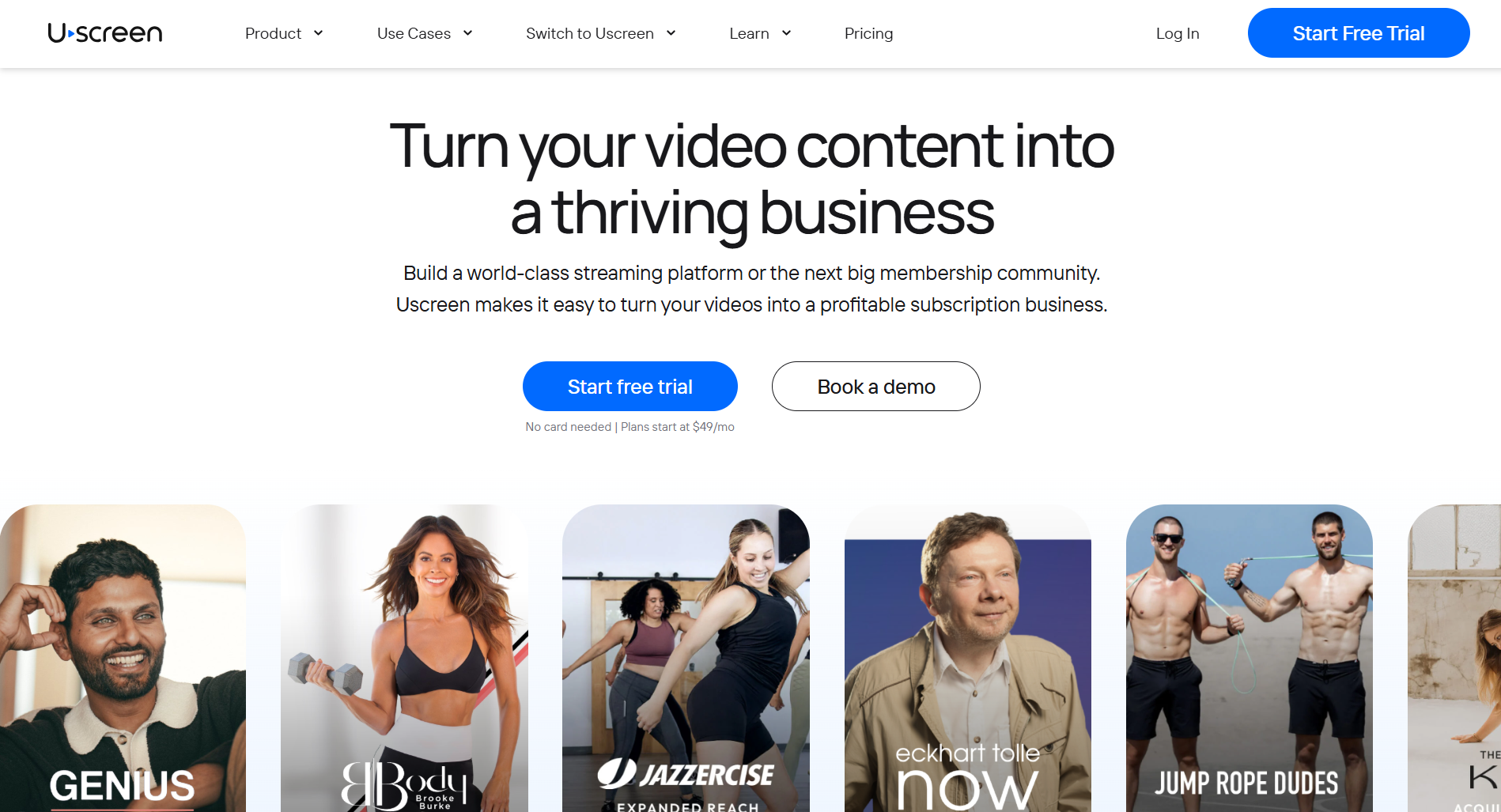
Uscreen (opens in new tab) is a video membership platform built for businesses that monetize video directly through subscriptions, pay-per-view, rentals, bundles, and lifetime access, all under their own brand. You host your content, set your pricing, and deliver it to your audience across web, mobile, and TV without sharing revenue with a marketplace or depending on another platform’s algorithm for discovery.
The core difference from general-purpose platforms is what Uscreen is built to do. Video is the product. A fitness instructor running a subscription catalog, a filmmaker offering a Netflix-style library of courses and live sessions, a media company building a paid streaming channel: these are the businesses Uscreen is built for. Your members’ data stays yours throughout.
What is Circle?
Circle (opens in new tab) is an all-in-one community platform built around discussions, courses, events, and live streams, with AI features included on every plan. You create Spaces, discussion boards, course areas, or event hubs, and gate each one by membership tier, so free and paying members see different parts of your community.
Circle was built with a course-and-discussion-first model. Video is supported, but it’s one content type among several. It isn’t the core focus. Circle optimizes for community and course delivery, and its feature set (workflows, member directories, live rooms) reflects that.
How do Uscreen and Circle compare in terms of pricing?
Both Uscreen (opens in new tab) and Circle (opens in new tab) add extra costs on top of the base plan through different mechanisms. Both also gate their most meaningful features behind higher tiers. What you actually pay depends on your membership count, revenue mix, and the features your business needs right now.
Uscreen pricing
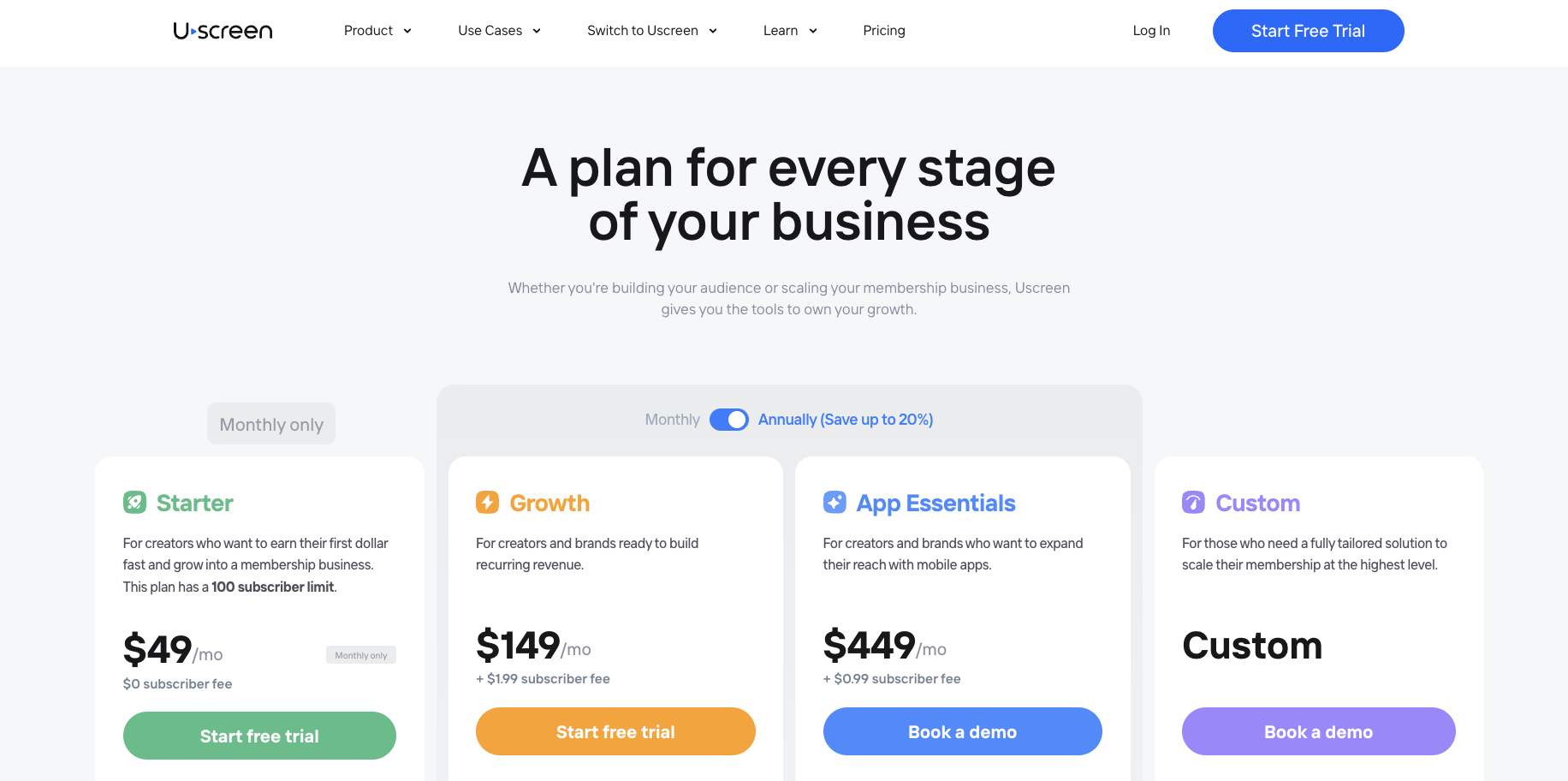
- The Starter plan costs $49/month and is billed monthly, with a 100-subscriber cap and a 10% fee on one-time sales. It covers the video catalog, native live streaming, marketing and automations, and smart analytics. It is a test-the-waters tier, not a long-term home.
- Growth plan runs $149/month (annual) or $199/month (monthly), adds a $1.99 per-subscriber fee, and drops the one-time sale fee to 5%. You get unlimited subscribers, a custom branded domain, and the full marketing stack. The per-subscriber fee is the number to watch: at 300 members, that is an extra $597/month on top of your base plan.
- App Essentials plan runs $449/month (annual) or $499/month (monthly), plus a $0.99 per-subscriber fee. This is where branded iOS and Android apps come in. Migration support also starts here.
- The Custom plan is quote-based and includes the same $0.99 per-subscriber fee. It is the only plan that includes five TV apps (Apple TV, Roku, Fire TV, Android TV, Samsung TV), community tools (channels, DMs, challenges, calendar, streaks, and badges), and a dedicated success manager.
Circle pricing
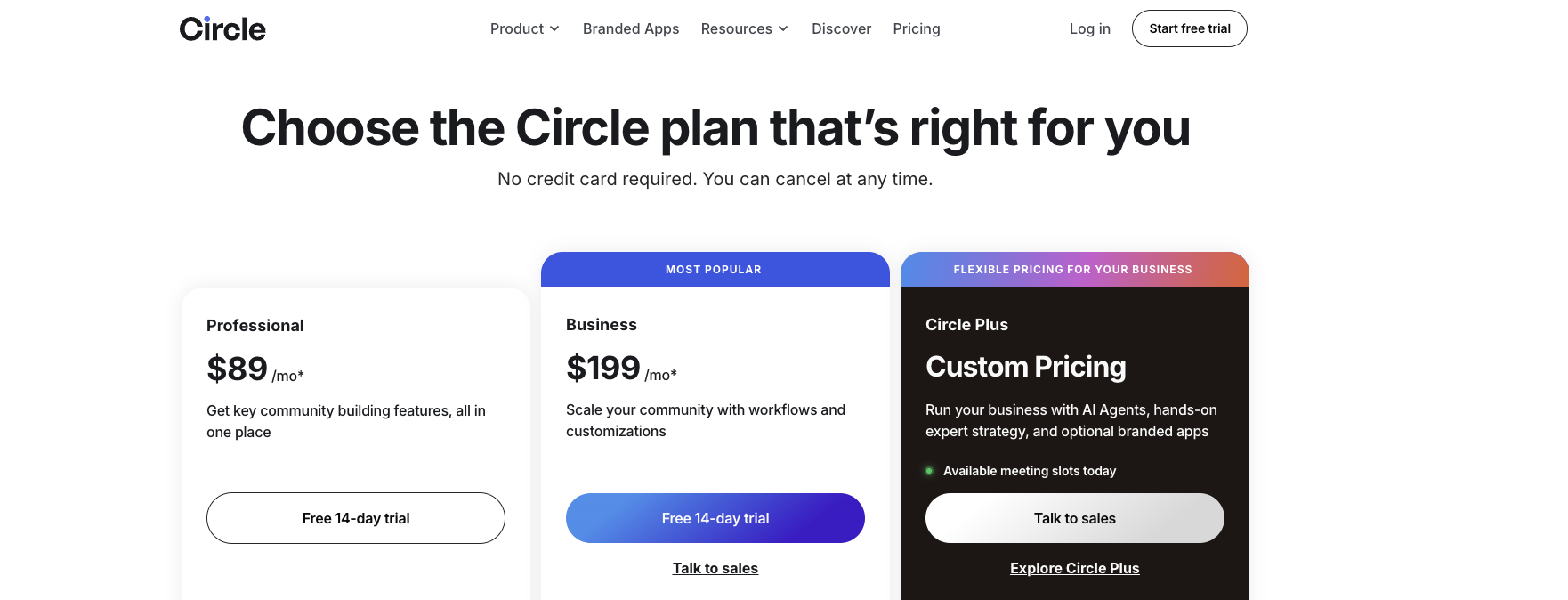
- Professional plan starts at $89/month with a 2% transaction fee. It includes unlimited members, courses, discussions, events, live streaming, gamification, and Circle AI on day one. You also get payment migration support and direct messaging from the entry plan.
- Business plan runs $199/month with a 1% transaction fee. This plan includes automations, workflows, API access, and standard migration services. Circle AI content writer and automated transcriptions are also Business-only.
- The Circle Plus plan is custom-priced and includes a 0.5% transaction fee. Branded iOS and Android apps are an optional add-on here, available through a sales conversation. Circle Plus also brings AI Agents, AI moderation, a knowledge engine, and priority migration support.
Main difference
Uscreen charges per subscriber regardless of what each member pays, while Circle takes a cut of your revenue. A business with many low-paying members pays more on Uscreen. A business generating high revenue per member pays more on Circle.
One-time sale volume also shifts the math, since Uscreen charges a 5% fee on one-time transactions across Growth, App Essentials, and Custom. Run both models against your own numbers before deciding.
How do Uscreen and Circle compare in terms of features?
| Feature | Uscreen Starter ($49/mo) | Uscreen Growth ($149/mo) | Uscreen App Essentials ($449/mo) | Uscreen Custom | Circle Professional ($89/mo) | Circle Business ($199/mo) | Circle Plus (Custom) |
|---|---|---|---|---|---|---|---|
| Video catalog | Yes | Yes | Yes | Yes | Via Spaces/courses | Via Spaces/courses | Via Spaces/courses |
| Native live streaming | Yes (1 hr/mo, no attendee cap) | Yes (1 hr/mo, no attendee cap) | Yes (1 hr/mo, no attendee cap) | Custom | Yes (10 hrs, 100 attendees) | Yes (15 hrs, 200 attendees) | Flexible |
| Courses | Via Collections | Via Collections | Via Collections | Via Collections | Yes, unlimited | Yes, unlimited | Yes, unlimited |
| Community (channels, DMs, challenges) | No | No | No | Yes | Yes | Yes | Yes |
| Gamification (streaks, badges) | No | No | No | Yes | Yes | Yes | Yes |
| Calendar | No | No | No | Yes | No | No | No |
| Automations and workflows | Basic (marketing automations) | Yes | Yes | Yes | No | Yes (20 automations) | Unlimited |
| AI tools | No | No | No | No | Circle AI (2,500 credits/mo) | AI content writer, transcriptions, Circle MCP | AI Agents, moderation, knowledge engine, AI workflows |
| Branded mobile apps (iOS/Android) | No | No | Yes (2 apps) | Yes (2 apps) | No | No | Optional add-on |
| TV apps | No | No | No | Yes (5 apps) | No | No | No |
| Migration support | No | No | Yes | Yes | Payments only | Standard (all types) | Priority (all types) |
| Analytics | Yes | Yes | Yes | Yes | Yes | Yes, advanced filtering | Yes, advanced filtering |
| Custom domain | No | Yes | Yes | Yes | Yes | Yes | Yes |
| API access | No | No | No | Yes | No | Yes (Headless + Admin) | Yes |
| Dedicated success manager | No | No | No | Yes | No | No | Yes |
What community tools do you get with Uscreen and Circle?
For most buyers, the plan-level gate on community tools is the most consequential difference between these two platforms. On Uscreen, community is a Custom-only feature. On Circle, it is the entry product.
Uscreen community tools
Every community feature on Uscreen is available on the Custom plan. Channels, DMs, challenges, the calendar, streaks, and badges are not available on Starter, Growth, or App Essentials. There’s no effective limit on channels; you can create as many as your community needs, each gateable by subscription tier. Members have social profiles that show their name, location, and community history.
Challenges let you run time-bound engagement programs across fitness, education, and other niches. The calendar integrates directly with your content and live streams, and content on the calendar gets 12x more viewers than content posted without it.
Circle community tools
Circle’s community tools start on the $89/month Professional plan and cover the full set from day one: threaded discussions, Spaces (public, private, or paid-access), direct messaging, group chat, member profiles, events, and a searchable member directory. Gamification (points, levels, badges, and leaderboards) also comes with every plan. Custom rewards tied to automated workflows require the Business plan ($199/month).
The AI layer adds another dimension. Circle AI ships on every plan with 2,500 credits per month, including AI summaries of long threads. The AI content writer and automated transcriptions start on Business. AI Agents, which handle 24/7 onboarding, proactive moderation, and automated member nurturing, are Circle Plus-only.
Do Uscreen and Circle offer TV and mobile apps?
If your audience watches on a TV, the two platforms truly part ways here. Uscreen offers branded iOS and Android apps (opens in new tab) starting on App Essentials ($449-499/month), and five TV apps (Apple TV, Roku, Fire TV, Android TV, Samsung TV) on the Custom plan. Your audience can find you on the same screens where they already watch everything else.
Circle doesn’t offer TV apps on any plan. Branded mobile apps (opens in new tab) are available only through Circle Plus, its custom-priced tier with a dedicated launch team, so getting a branded app at all requires a sales conversation and a quote.
This isn’t a flaw in Circle’s model; it’s a difference in what each platform is built for. A discussion-first community doesn’t need a living-room screen the way a video catalog does. But if reaching viewers on a TV matters to your business, Uscreen is the only one of the two that offers it at any price.
How does migration work on Uscreen vs Circle?
Uscreen’s Migration Team (opens in new tab) works with you to tailor the migration to your goals and timeline, covering your content, members, and payment methods in one coordinated process. Circle handles migration (opens in new tab) as three separate services (payments, courses, and Email Hub), each with its own eligibility rules and support levels tied to your plan. The two platforms get you across the line, but through very different paths.
Here is what that looks like in practice:
- Uscreen: Most migrations take 30 to 60 days, tailored to your goals and timeline, with scheduled calls and a dedicated point of contact from start to launch. Your members sign in via magic link on day one. Payment methods carry over automatically for most members, with PayPal being the one exception. Payment history and invoices do not migrate. Uscreen’s Migration Team has completed thousands of successful migrations.
- Circle: Payment migration is free across all plans. Course migration is available on Business annual plans and above. Email Hub migration (opens in new tab) covers contacts, automations, and campaigns, and is a separate service with its own eligibility criteria. Circle Plus customers get priority handling across all three, with a concierge team that coordinates the full move.
Uscreen vs Circle: which one should you choose?
If your members come for video with a catalog, live streams, or both. Uscreen is built around that. If they come for community, courses, and events, Circle is the stronger fit.
Here’s what to weigh when making the call:
- What your members are looking for: If video is the product, Uscreen’s monetization stack (subscriptions, pay-per-view, rentals, bundles, and lifetime access) is purpose-built for it. If discussion, courses, and live events are the core value, Circle’s structure fits better. Pick the platform that mirrors what members come for.
- Whether TV viewing matters: Uscreen offers five TV apps (Apple TV, Roku, Fire TV, Android TV, and Samsung TV) on its Custom plan. Circle offers none on any plan. If your audience watches on a living-room screen, that difference is decisive.
- When you need community tools: Circle includes discussions, spaces, and events from its $89/month entry plan. On Uscreen, community features require the Custom plan. If community is part of your offer now, and you’re not yet at Custom-tier scale, Circle gets you there faster.
- How the pricing math works for you: Uscreen charges a flat per-subscriber fee; Circle takes a percentage of revenue. A smaller member base at a higher price point typically favors Uscreen. A larger base at a lower price point often favors Circle. Run both models against your own numbers before deciding.
Start building your video membership business with Uscreen
Uscreen is the best platform if your audience engages most with your videos.
Here is how to move forward:
- Start a free trial on the Starter plan: The (opens in new tab) Starter plan (opens in new tab) costs $49/month with no credit card required. You get the video catalog, live streaming, and marketing tools from day one, so you can see the platform running before you commit.
- Book a demo for App Essentials or Custom: If you already have an audience and want branded mobile or TV apps as part of your setup, book a demo (opens in new tab) instead. The team will walk you through the plan that fits your current member count and growth goals.
- Migrate from Circle with dedicated support: Uscreen’s Migration Team (opens in new tab) handles the full move. Your members get their accounts set up and sign in via a magic link sent by email on launch day. Payment methods carry over automatically for most members, except PayPal.